What if the payment setup with the lowest headline rate creates the most work behind the scenes? Fitness studio payment processing affects more than transaction costs. It shapes how members pay, how you manage billing issues, and how easily payments connect with bookings and memberships. Comparing p...

What if the payment setup with the lowest headline rate creates the most work behind the scenes? Fitness studio payment processing affects more than transaction costs. It shapes how members pay, how you manage billing issues, and how easily payments connect with bookings and memberships.
Comparing providers can feel complicated when fees use different models. When a payment fails or a member disputes a charge, follow-up can quickly eat into your day. If bookings, memberships, and payments live in separate systems, even routine tasks can take longer.
This guide explains the main components of processing costs and how to compare payment methods and billing workflows against your studio’s needs. You’ll find practical ways to reduce avoidable admin, handle payment issues, and assess how well a platform supports day-to-day operations. StudioBookings brings payment processing together with class scheduling and membership management in one dashboard, helping studios organize these essential tasks in one place.
• Map the member payment journey from booking or sign-up through confirmation and account records to spot workflow gaps.
• Compare fitness studio payment processing costs across equivalent billing periods, including transaction fees, monthly charges, refunds, disputes, and reconciliation effort.
• Use a practical checklist to assess payment methods, recurring billing, recordkeeping, support, and dispute handling.
• Review recent statements and track refunds, disputes, failed collections, and staff time to identify your biggest payment bottlenecks.
• Consider how bringing scheduling, memberships, payment processing, and staff management into one dashboard can support a more connected studio workflow.
Fitness studio payment processing is more than accepting a card or another payment method. It’s the transaction and billing workflow that takes a member from choosing a class or membership to paying, receiving confirmation, and having the transaction recorded. That workflow may involve a payment processor, your booking and membership records, and the steps your team follows to track each payment.
For an overview of a processor’s role in a transaction, see Understanding Payment Processors. Your studio also needs a clear record of what each payment covers. A payment confirmation alone won’t show whether it was for a monthly membership, class pack, or workshop unless that information is connected to the member’s account and purchase.
A clear workflow makes it easier to track expected income, answer member questions, and identify payments that need attention. A confusing one can leave staff searching through records and members unsure whether a booking is confirmed. Keep processing fees separate from software subscription charges, refunds, dispute-related costs, and staff time spent reconciling records. Each affects your overall costs and workload differently.
Every paid offering needs a way to connect the purchase, payment, and member record. That includes recurring memberships, class packs, drop-in sessions, workshops, and other studio offerings. The timing and booking rules vary: a membership may bill on a recurring schedule, a drop-in is tied to one booking, and a class pack may be used across multiple visits.
For example, a member books a Saturday class as a drop-in. The workflow should show the selected class, payment status, booking confirmation, and transaction in the member’s account. If any of those details are missing, staff may need to search separate records before answering a straightforward question.
Booking, membership status, and payment records answer different but related questions: What did the member reserve? What access or package do they have? Was the payment recorded? When those details are stored separately, reconciliation takes more manual effort, and staff may need to switch between records to work out what happened.
Fitness studio payment processing is the workflow that collects a member’s payment and connects it to the booking, membership, and account records needed to manage the transaction. Treat it as part of studio operations, not just a checkout step. Map the journey to see where information is recorded, where staff must intervene, and where a more connected management workflow could reduce administrative friction.
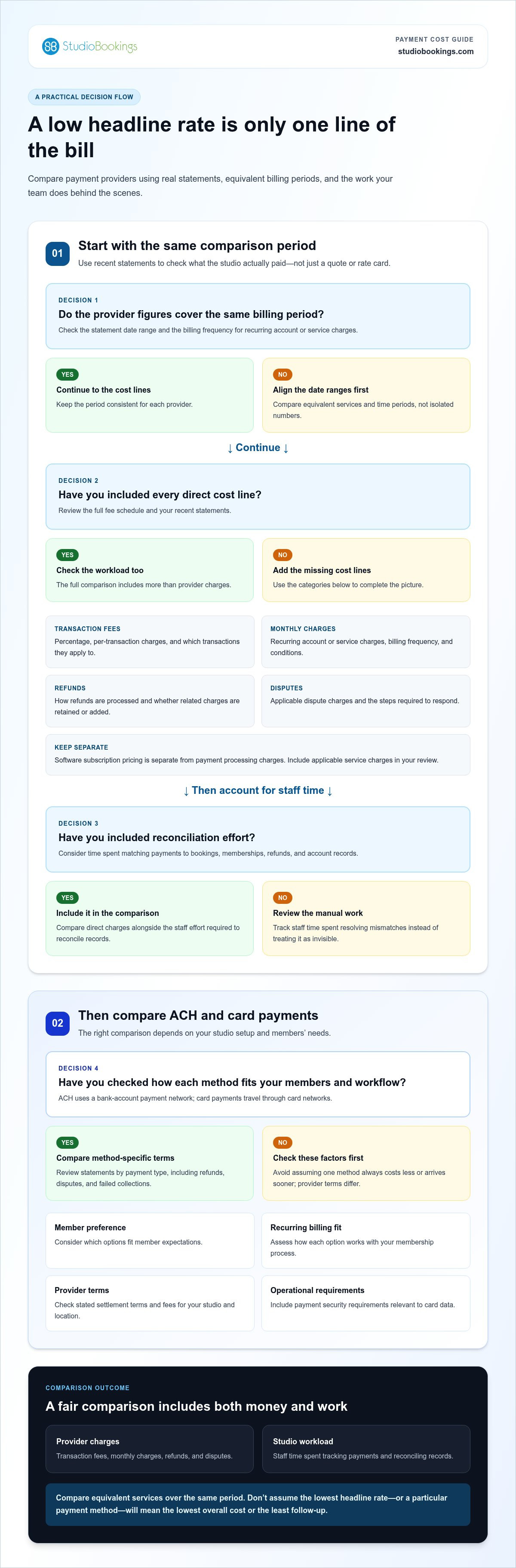
A headline transaction rate can look attractive while leaving out charges or work that affect your monthly total. To compare fitness studio payment processing fairly, look beyond the percentage. Review the full fee schedule, the billing period it covers, and the staff time required to reconcile payments with studio records. Providers structure charges differently, so compare equivalent services and time periods rather than isolated numbers.
Use recent statements to check what you actually paid, not just what a quote or rate card suggests. Separate direct charges from the time your team spends resolving mismatches. Refund and dispute terms vary, so read how each is handled. Don’t assume the original transaction charge is returned or that disputes cost the same across providers.
| Cost area | What to compare |
|---|---|
| Transaction fees | Percentage, per-transaction charges, and which transactions they apply to. |
| Monthly charges | Recurring account or service charges, billing frequency, and any conditions. |
| Refunds | How refunds are processed and whether related charges are retained or added. |
| Disputes | Applicable dispute charges and the steps required to respond. |
| Reconciliation effort | Staff time spent matching payments to bookings, memberships, refunds, and account records. |
Keep software subscription pricing separate from payment processing charges. They are different parts of the total cost, even when one platform brings studio management tasks together. Include any applicable service charges and check that the statement’s date range matches the period you’re comparing. A basic monthly record can help you spot changes in costs or manual work over time.
ACH is a bank-account payment network. Card payments travel through card networks. The practical choice depends on your payment setup and members’ needs. Compare member preference, how each option fits recurring billing, the provider’s stated settlement terms, and the fees that apply to your studio and location. Don’t assume one method always costs less or arrives sooner. Terms differ by provider.
For a useful comparison, review statements by payment type and note differences in handling refunds, disputes, or failed collections. Consider how each option fits your booking and membership process, too. A method that appears less costly may require more staff follow-up, while a familiar option may better suit member expectations. Use the PCI DSS Compliance for Fitness Studios resource to understand payment security standards relevant to card data, and include related operational requirements in your assessment.
StudioBookings brings scheduling, memberships, payment processing, and staff management into one dashboard. StudioBookings studio management software lets you consider payments as part of your wider studio operations.
The lowest advertised rate isn’t automatically the best fit. Your payment workflow also needs to suit your members, support your billing model, and give staff clear records when they need to resolve a question. Compare options against your studio’s actual routines, including busy booking periods, recurring charges, refunds, and dispute follow-up.
Use this checklist to make the comparison practical:
Identify which options are available in your operating market and relevant to your members.
Check how the workflow supports your membership schedule and how staff can identify a payment that needs attention.
Review whether reports make it straightforward to match transactions with member accounts, bookings, and billing periods.
Understand the steps, records, and support available when a member questions a charge or requests a refund.
Review how support is provided and how the provider communicates interruptions or changes that could affect payments.
Test the workflow against a realistic rush, such as several members booking popular classes at the same time. Consider what happens if a payment takes longer than expected or a service interruption occurs. How will staff know what’s affected? What will members see? Where can your team find updates? Clear answers help you judge whether the process is manageable during a peak period, not just during a quiet test.
Review security information with the same care. PCI DSS requirements depend on how payment data is handled and on the roles of the businesses involved. Don’t assume that using a third-party processor removes every responsibility for your studio. Read current documentation from your payment provider and the PCI Security Standards Council to understand the obligations that apply to your setup. Use specific, current guidance rather than relying on broad marketing statements.
Compare card and ACH availability in your market, then weigh member preference against the way you bill. Recurring memberships, class packs, and one-off bookings can have different timing and account-record needs. Review the provider’s terms for applicable fees and settlement instead of assuming a method is always faster or cheaper. For multiple locations, check whether reporting and administration give you a consistent view across sites.
Compare the complete workflow, not a single rate. A lower advertised price may be offset by other charges, harder-to-use reports, or extra reconciliation work. A good fit is one your team can understand and manage, with terms and processes that align with the way your studio takes bookings and collects payments.
Before changing systems or renegotiating terms, get a clear picture of how payments work today. This fitness studio payment processing audit helps separate cost issues from workflow gaps and turn your findings into practical priorities.
Follow a membership purchase, class-pack sale, and one-off booking from the member’s first action through payment, confirmation, and the final account record. Note where each detail lives and who handles it.
Compare payment statements for the same billing period. Record transaction charges, refunds, disputes, and failed collections, then note differences between the amounts shown in statements and studio records.
Track where staff re-enter information, search across systems, or manually match payments to bookings and memberships. Note unclear payment statuses and estimate the time spent resolving them during a typical work period.
Group findings into issues your studio can address, such as unclear cancellation or refund policies, and limitations that may depend on software or provider capabilities. Rank each by its impact on member support and staff workload.
Choose a sample transaction and trace it step by step. Can staff see which class or membership it relates to, whether payment was recorded, and what appears in the member’s account? Look for duplicate entry or missing context. Review refund, cancellation, and dispute records for recurring patterns, but don’t assume a pattern explains the cause. Record what you observe before deciding what needs to change.
Keep the audit focused on evidence: statements, account records, staff steps, and member questions. A repeated mismatch may point to a policy that needs clearer wording, a process that needs a defined owner, or a system limitation. Separating these possibilities helps you avoid trying to solve every problem with a provider change.
If your audit points toward a transition, document active memberships, billing schedules, outstanding balances, and the records your staff use to answer payment questions. Identify who will communicate changes to members and how you’ll maintain billing continuity during the transition. A written plan gives your team a shared reference and helps surface gaps before they affect routine operations.
Payment decisions also connect to scheduling, membership management, and staff workflows. The boutique studio management guide can help you consider those wider operational links alongside payment needs.
Connect your audit findings with a more unified studio workflow. Explore StudioBookings studio management software for scheduling, memberships, payment processing, and staff management in one dashboard.
Your audit may show that the main problem isn’t the transaction itself. It could be the extra steps staff take to check a booking, confirm membership status, and locate a payment record. StudioBookings brings class scheduling, memberships, payment processing, and staff management into one dashboard, so your team can manage these core tasks within the same studio platform.
A shared workspace is especially relevant if your findings include scattered records or frequent switching between tools. The platform brings management functions together, while your studio still needs to understand the payment terms and processes that apply to its setup. Consider how this workflow fits the information your team needs to handle daily tasks.
A dashboard that brings these functions together gives staff one management environment for scheduling, membership management, and payment processing. That can make routine administration easier to navigate and reduce fragmented work across studio operations.
Illustrative example: A member asks whether their class booking and membership payment are both recorded. With scheduling, memberships, and payment processing available in the same dashboard, staff have one place to review the relevant areas and respond. This example shows how a connected management workflow can help staff find related information.
StudioBookings serves fitness, yoga, Pilates, barre, dance, and cycling studios. If your audit also raised questions about how software supports broader studio operations, the yoga business software growth guide explores related workflows from a business-growth perspective.
Compare the platform’s management scope with your audit priorities. Consider your studio’s disciplines, how you sell memberships and classes, and which daily tasks create the most friction. If staff need to move between scheduling, membership records, payment processing, and staff management, having those functions in one dashboard may suit the way you want to organize operations.
Use the free trial to explore the workflow directly. Try tasks that matter to your team, such as reviewing a class schedule alongside membership and payment information, and note whether the setup makes routine administration clearer. StudioBookings also offers no-contract pricing. Keep the software subscription and payment-processing charges as separate considerations when assessing total costs.
If a more connected workflow matches your audit findings, explore StudioBookings and start your free trial. Assess the platform against your studio’s management needs and decide whether it fits.
Your next step doesn’t have to be a full system overhaul. Use your audit priorities to decide what would make daily payment administration clearer for your team and easier to manage alongside studio operations. The right fitness studio payment processing workflow should support the way your studio runs, not add another layer of disconnected tasks.
StudioBookings is cloud-based studio management software that brings scheduling, memberships, payment processing, and staff management into one dashboard. Its free trial lets you explore that workflow directly, and its no-contract pricing offers flexibility as you assess what fits your studio. Payment-processing charges are separate from the software subscription, so factor both into your evaluation.
Ready to see whether a more connected setup suits your studio? Explore StudioBookings and start your free trial. Use the trial to see how your studio’s essential management tasks can work together.
No. They serve different roles, though one platform may bring some functions together. A payment processor routes transactions and provides related payment services. Studio management software can connect payment activity with bookings, memberships, staff, and studio records. Capabilities vary, so look at how the pieces work together in practice. For example, can a staff member answer a billing question without checking several separate systems?
Yes, recurring membership billing is an option for many studios, but schedules and payment methods depend on the processor and the studio’s setup. Before using it, decide how members will learn their billing dates and how changes, pauses, or cancellations will be recorded. For example, if a member changes plans mid-cycle, staff should be able to find the relevant policy and account history before responding.
There isn’t one universal cost. Charges depend on the provider, transaction type, payment method, and contract terms. To estimate your costs, organize a recent statement by charge type and compare it with a period of similar activity. Include recurring account charges and any refund or dispute costs, then consider staff reconciliation time separately. Studio subscription fees are also separate from payment-processing charges, so review each on its own.
ACH moves funds through a bank-account network, while card payments run through card networks. The best fit depends on what members are comfortable using and how your studio bills. For example, consider whether a method suits a recurring membership differently from a one-time workshop booking. Compare provider terms for timing and fees in your market rather than assuming one payment type is always cheaper or more convenient.
Start by making payment follow-up predictable. Assign a staff owner to review exceptions, record member contact, and note how each issue was resolved. A short, consistent process can help prevent the same account from being reviewed repeatedly without context. Track whether problems cluster around a particular billing situation, but investigate each case rather than assuming one cause. Clear records also make handoffs between staff easier.
Security depends on the processor, the systems involved, and how your studio handles payment information. Read current provider security and PCI DSS documentation to understand the responsibilities that apply to your setup. Avoid putting sensitive payment details in spreadsheets, email, or other informal records. If your studio operates across countries, review the requirements and payment practices relevant to each market instead of assuming one approach applies everywhere.
Not based on the advertised rate alone. Compare the full terms and day-to-day workload, then weigh potential savings against the effort and risks of a transition. Before deciding, check whether your current records provide a fair comparison across similar billing periods. If you switch, plan how staff will access the information they need and how members will be told about any changes. A lower rate only helps if the new workflow also fits your studio.