
Your phone can keep studio admin moving while you’re away from the front desk. To learn how to manage a studio from a phone, bring class scheduling, memberships, payments and staff management into one cloud-based system, then use its mobile access for the tasks you need to handle on the go.Studio ad...

Your phone can keep studio admin moving while you’re away from the front desk. To learn how to manage a studio from a phone, bring class scheduling, memberships, payments and staff management into one cloud-based system, then use its mobile access for the tasks you need to handle on the go.
Studio admin doesn’t have to wait until you’re back at a computer. Routine tasks are easier to manage remotely when key studio information is together in one place. The aim isn’t to spend more time on your phone, but to handle updates promptly and reduce the back-and-forth that keeps you tied to the studio.
This guide covers the studio tasks you can handle from your phone, ways to simplify them, and when a mobile workflow is useful. It also explains how an integrated system can bring scheduling, memberships, payments and staff details together, leaving you more time to support your studio.
• Use mobile access to keep essential studio admin moving when you’re away from the front desk.
• Handle practical tasks such as reviewing class schedules and membership information from one place.
• Keep your workflow focused: deal with time-sensitive updates on your phone and save more involved admin for later.
• Bringing scheduling, payments and staff management together can make remote studio tasks easier to manage.
• Choose tools designed for your studio type to support a smoother day-to-day routine.
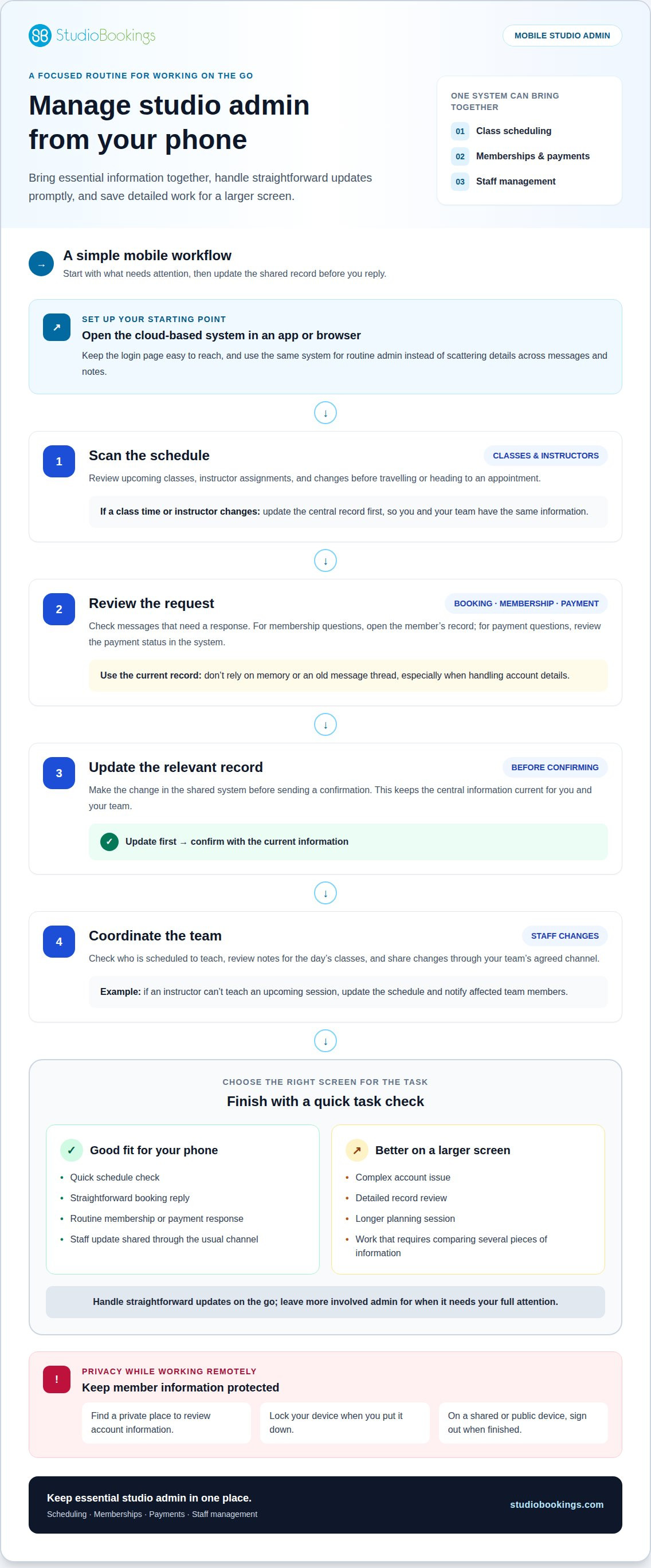
A practical way to manage a studio from a phone is to use a cloud-based system that brings key tasks together. Open it in an app or browser, then focus on the information you need for the next decision. For example, check the day’s schedule before replying to a member’s question about a booking.
Mobile access is often delivered through web browsers, including SSL VPNs and individual web applications, according to the National Institute of Standards and Technology. For a studio owner, this means the main requirement is a reliable way to sign in to the management system. Keep the login page easy to reach, and use the same system for routine admin rather than scattering details across messages and notes.
Start with the schedule. Review upcoming classes, instructor assignments and changes before heading to an appointment or travelling between locations. If a member asks whether a class is running, check the current schedule before replying. Update the central record first whenever a class time or instructor changes, so you and your team have the same information.
Membership and payment tasks can also fit into a phone-based routine. When a member asks about their membership, open their record and reply using the information there. If a payment needs attention, review its status in the system and follow your usual process. Don’t rely on memory or an old message thread, especially when handling account details.
Staff coordination is another task you can manage remotely. Check who is scheduled to teach, review notes for the day’s classes and share changes through your team’s agreed channel. If an instructor can’t teach an upcoming session, for example, update the schedule and notify the affected team members. A clear, current record helps prevent mixed messages.
Use a simple routine to keep phone admin focused:
• Open the schedule and scan for changes to classes or instructors.
• Review messages that need a booking, membership or payment response.
• Update the relevant record before sending a confirmation.
• Share staff changes through the team’s usual communication channel.
• Leave complex tasks for a larger screen when they need detailed review.
This approach separates quick decisions from work that needs more attention. A booking question may only require checking a class listing, while a complicated account issue may take longer. Handling a straightforward update on your phone means it won’t wait until you return, without forcing every task onto a small screen.
Protect member privacy whenever you use your phone outside the studio. Find a private place to review account information, lock your device when you put it down, and keep personal details out of view. On a shared or public device, sign out when you finish.
Finally, decide which tasks belong in your mobile routine and which are better handled at a desk. A quick schedule check, a straightforward booking reply or a staff update can often be managed while you’re away. Detailed record reviews, longer planning sessions and work that requires comparing several pieces of information may be easier on a larger screen. That distinction keeps mobile admin useful, rather than turning every spare moment into work.
StudioBookings brings studio management together, so you can handle essential admin without relying on separate notes and systems. Its cloud-based platform covers class scheduling, memberships, payments and staff management. The StudioBookings Mobile App gives owners mobile access to studio management.
Choose software that suits your classes and daily workflow, whether you run yoga, Pilates or barre, fitness or HIIT, or pole and dance sessions. The right setup lets you manage routine updates remotely and keep key information organized in one place.
If you’re ready to make studio admin easier to manage from your phone, contact StudioBookings to discuss your studio’s needs.
Before changing your routine, decide which studio tasks you want to handle while you’re away and which can wait until you’re back at a larger screen. This distinction can help you choose a setup that supports your working day instead of creating another place to manage information. Next, match your studio’s needs with software built for its classes and operations.
StudioBookings offers software for yoga, Pilates and barre, fitness and HIIT, and pole and dance studios. Its cloud-based platform brings studio management together, and the mobile app lets you access it on the go. If you’re working out how to manage a studio from a phone, start a free trial to see how mobile access fits your schedule and regular tasks.
Contact StudioBookings to talk about a setup that fits your studio. A more manageable admin routine can start with one practical change, and you can build from there.