The hidden cost of studio spreadsheets is the time they take to maintain. The reason why spreadsheets are bad for managing a studio is that schedules, payments, memberships, and staff details need constant manual updates, and separate versions can quickly become confusing. Small errors or outdated i...

The hidden cost of studio spreadsheets is the time they take to maintain. The reason why spreadsheets are bad for managing a studio is that schedules, payments, memberships, and staff details need constant manual updates, and separate versions can quickly become confusing. Small errors or outdated information can make everyday decisions harder.
Spreadsheets can feel like a simple way to keep your studio organized, especially when you’re getting started. But as operations grow, checking entries, correcting mistakes, and reconciling records can take time away from running classes and supporting members.
This article explains where spreadsheet-based studio management creates friction, from financial tracking and shared records to the work of keeping information current. You’ll also learn which alternatives can bring key tasks together and reduce manual work, helping you choose an approach that fits your studio.
• Learn why multiple spreadsheet versions can leave you unsure which schedule or record is current.
• See how manual financial tracking makes it harder to catch errors and keep studio records aligned.
• Compare spreadsheets with specialized software that brings key management tasks into one system.
• Understand how scattered updates can slow decisions when you need a clear view of studio activity.
• Explore how studio management software can reduce repetitive admin around classes, memberships, payments, and staff.
Shared spreadsheets become confusing when owners and staff edit separate copies of a class schedule. The latest file may not include the latest change.
Version control means tracking edits so the team can identify the current, correct spreadsheet. Without a shared editing process, an instructor might update a class time in one copy while the owner changes a different one. Both files look familiar, but only one reflects the decision. Clear file names and a designated editor can help, but only if everyone follows the same process.
Multiple file versions are separate copies of one spreadsheet, often stored in email attachments, shared folders, or personal devices. Names like “Schedule final” and “Schedule final updated” don’t tell staff which copy is reliable. Copying information between files can cause changes to be missed or overwritten. Checking dates and comparing entries adds another task before the team can act.
How do spreadsheets cause scheduling conflicts and double bookings in studios? If a staff member books a room using an outdated schedule, another instructor may already have reserved it in a newer copy. For example, an owner could move a Pilates class in one file while a receptionist confirms the original time from another. Manual tracking must catch the mismatch.
When are spreadsheets still a good fit for managing a small studio? A spreadsheet can work for a small amount of information, especially when one person maintains a simple schedule for a single purpose. A solo instructor tracking weekly class times in one file has fewer collaboration points to manage. As staff, rooms, and changes enter the process, that format becomes harder to maintain.
To reduce version confusion, establish one source file, name its owner, and record changes in a tracking column. For example, a schedule can include the class, room, time, and person who made the latest edit. This makes updates easier to review, but still depends on staff using the right file and entering changes consistently.
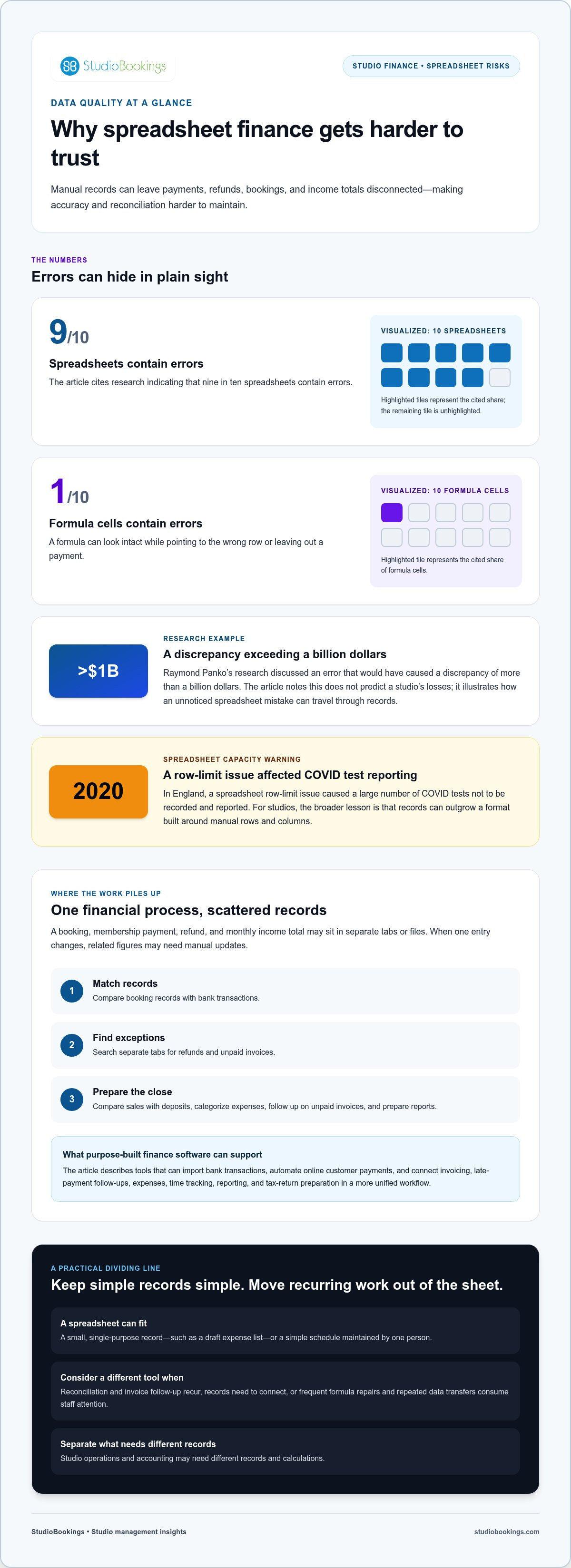
The risk of relying on manual checks extends beyond studio schedules. Nine in 10 spreadsheets contain errors, and Raymond Panko’s research discussed an error that would have caused a discrepancy of more than a billion dollars. That example doesn’t predict a studio’s losses; it shows how a small formula or entry mistake can travel through a spreadsheet unnoticed. Clear version practices help, but they can’t remove the need to review data.
A studio spreadsheet can record payments and expenses, but it doesn’t manage each financial step as one connected process. A class booking, membership payment, refund, and monthly income total may sit in separate tabs or files. If one entry changes, you may have to update every related figure yourself, making it harder to keep records accurate and ready for decisions.
Formula cells add another risk. One in 10 formula cells contain errors. A missing minus sign, a misplaced parenthesis, or a copied formula that points to the wrong row can distort totals without changing how the sheet looks. For example, a studio might copy a monthly income formula downward, but one copied cell could omit a payment row. The total then appears complete while understating recorded income.
A spreadsheet works best with a small, clearly organized set of information. It becomes difficult to maintain when used as a database for member details, attendance, payments, and invoices. A member’s name might be entered differently in two rows, or a payment might lack a matching membership. Unlike specialized software, a spreadsheet won’t automatically connect those records or flag every inconsistency.
That separation affects routine finance work. To reconcile income, an owner may compare booking records with bank transactions, then search separate tabs for refunds and unpaid invoices. Finance software can import bank transactions and automate online customer payments. Spreadsheets leave more matching, checking, and follow-up to the person maintaining them.
Spreadsheet capacity isn’t only about how many rows a file can hold. Growing formulas, linked tabs, and extra data can make a workbook slower and more complicated to check. In England, a spreadsheet row-limit issue caused a large number of COVID tests not to be recorded and reported in 2020. For a studio, the broader lesson is practical: records can outgrow a format built around manual rows and columns.
Growth adds complexity. A studio may begin with one schedule and a simple income sheet, then add class types, instructors, payment statuses, and expense categories. Each new tab or formula creates another place for inconsistent entries or calculation errors. Adding applications can mean more manual transfers between systems, not clearer finances.
Consider a monthly close. You need to compare recorded sales with deposits, categorize expenses, follow up on unpaid invoices, and prepare financial reports. If those tasks live in separate spreadsheets, staff must repeatedly copy and check values. Finance software can connect invoicing, late-payment follow-ups, expenses, time tracking, reporting, and tax-return preparation in a more unified workflow.
• Keep a spreadsheet for a small, single-purpose record, such as a draft expense list.
• Move recurring reconciliation and invoice follow-up into purpose-built finance software.
• Separate studio operations from accounting when each needs different records and calculations.
These limits matter when figures guide staffing, class capacity, or spending decisions. If a workbook needs frequent formula repairs or repeated data transfers, its apparent simplicity may be costing more staff attention than it saves.
The best spreadsheet alternative depends on which tasks create the most manual work. A class schedule may need a different tool from expense tracking, invoicing, or financial reporting.
How do studio management software tools compare with spreadsheets in features and pricing? Spreadsheets offer flexible rows, columns, and formulas; studio management software can connect class schedules, memberships, payments, and staff records. Pricing varies with the selected features and the studio’s needs, and is provided after a quote request.
Cloud-based platforms store information online and let authorized team members access it through web-enabled devices. Unlike a spreadsheet passed around as an attachment, a shared cloud record keeps updates together. An owner can review the current class list while a staff member updates a booking, rather than combining separate files later.
Dedicated finance software is another alternative when accounting tasks dominate the workload. It can support invoicing, late-payment follow-ups, expenses, time tracking, financial reporting, and tax returns. An invoice and its payment status can stay together, rather than requiring someone to update separate spreadsheet columns and manually chase overdue entries.
What studio management tasks can be automated with dedicated software? Depending on the platform, studios can manage class schedules, memberships, online payments, and staff records in one system. Finance applications can also handle invoices, expense tracking, payment follow-ups, and reports, reducing repeated entry across separate records.
Specialized analytics software can help when the main task is examining performance data rather than managing daily bookings. A studio could use it to compare attendance trends across class types while keeping operational records in software designed for scheduling and memberships. Choosing tools by task helps avoid forcing one spreadsheet or application to do everything.
How can a studio migrate its data from spreadsheets to management software? First, inventory the files and identify which records are still needed, such as active memberships or upcoming classes. Remove duplicates, standardize names and dates, map spreadsheet columns to the new system’s fields, and import the cleaned data. Review sample records and compare key totals before relying on the new system.
A staged move can make the change easier to manage. Transfer the current schedule first, confirm class names and times, then move membership and payment records. Keep an untouched copy of each original file during the transition, and assign a staff member to resolve mismatches. Don’t treat old formulas as verified facts; check the underlying entries.
Spreadsheets can still support a one-off calculation or a small working list. But if your team repeatedly corrects formula mistakes, transfers booking details manually, or updates the same payment in multiple places, a specialized cloud platform may be a better fit.
A spreadsheet can show studio information without making it clear which changes are current or who made them. Separate spreadsheet files don’t reliably keep updates in sync, making crucial information harder to share. If an owner reviews yesterday’s attendance while an instructor has updated another copy, they’re working from different figures.
That gap affects everyday decisions. Suppose a studio owner is deciding whether to add a class after seeing a full roster. The receptionist may have recorded cancellations in another file, while the owner’s version still shows every booking. The owner must reconcile the records first, and a delayed update can make demand appear higher than it is.
Change tracking helps teams understand what changed and why. A simple log can record the date, affected class or record, editor, and reason for each update. If a class moves rooms, for example, the log can show whether the change came from an instructor request or a room conflict. Without that context, staff may spend time reconstructing decisions from messages and cell edits.
Human error adds another layer of uncertainty. A staff member may sort only one column, paste over a formula, or enter a cancellation in the wrong row. The sheet can still look complete, allowing errors to affect attendance summaries or staffing analysis. When a decision relies on several tabs, checking each relevant entry takes attention away from acting on the result.
This is a broader business issue, not just a studio concern. A Daptiv survey found that 76 percent of IT organizations relied on spreadsheets for critical decision-making. That figure doesn’t describe studio operators, but it illustrates how spreadsheet-based decisions can depend on records that need careful handling. A studio owner faces the same basic challenge when staffing, class capacity, or spending decisions rely on manually updated data.
• Record the editor and reason whenever a schedule or financial entry changes.
• Use one agreed source for each decision, such as the current attendance record.
• Compare source entries with summaries before acting on a trend or total.
These checks make spreadsheet decisions more traceable, but they also add work. If a manager must message staff, inspect separate copies, and compare rows before confirming a class change, the decision is already delayed. A shared, purpose-built system keeps operational updates together, making it easier for the team to use the same current records.
The labor cost of a spreadsheet often hides in the tasks around each update. Someone must collect entries, format them, inspect totals, and prepare a useful summary. For a studio, that might mean gathering attendance, class changes, instructor hours, and payment records before reviewing the week. Each handoff takes attention, especially when the same information must be copied into several sheets.
The work can stretch beyond a studio’s weekly routine. Companies may spend two to three months collecting, checking, and formatting spreadsheet values for an event such as an insurance renewal. Studio records can create similar administrative drag when information sits across separate files. Owners and staff may struggle to assemble a complete picture before a deadline, leaving less time for members and classes.
Repeated checking also consumes labor without improving the underlying process. A manager may compare a class attendance sheet with instructor notes, then ask staff to clarify an incorrect entry. If a detail is missing, the manager pauses the analysis, contacts the person who recorded it, and revises the summary. What should be a straightforward review can turn into several rounds of manual work.
To see where the effort goes, map one recurring process from start to finish. A monthly review could include these tasks:
• Collect attendance, payment, and instructor-hour records.
• Check entries and correct missing or inconsistent details.
• Format the information, calculate totals, and prepare a report.
• Send questions to staff and update the final summary.
That list makes hidden labor visible. Track which steps require copying, checking, or follow-up, then consider whether a purpose-built application can eliminate repeated handling. Keep spreadsheets for occasional calculations, but reconsider them when staff repeat the same collection process for every report or renewal.
Time spent waiting for a workbook matters too. Some spreadsheets can take all night to compute. With more suitable tools, computation time can be cut to a few minutes. A studio may not run calculations at that scale, but the example shows how a tool’s limits can turn a quick review into a delay.
The practical takeaway is to compare the full process, not just the time spent typing. Include collecting records, checking entries, fixing mistakes, and preparing decisions. If those steps repeatedly interrupt studio operations, moving routine tasks to software designed for them can reduce manual effort and give staff more time for their core work.
StudioBookings brings class scheduling, memberships, payments, and staff management together in one dashboard, reducing the need to maintain separate studio spreadsheets. Consider it when manual updates and scattered records are taking time away from managing classes and supporting members.
Alongside Yoga Studio Software, StudioBookings offers software for Pilates and barre, fitness and HIIT, and pole and dance studios. Studio owners and members can also use the mobile app. Explore the platform with a free trial that requires no credit card, and use it without a contract.
See whether StudioBookings fits your studio’s workflow by visiting studiobookings.com.
Your next step doesn’t need to be a sweeping overhaul. Start by choosing one recurring admin task that takes attention away from teaching, welcoming members, or planning your studio’s next season. Decide what a better process should make easier for you and your team. That gives you a practical way to assess whether your current setup still fits.
Understanding why spreadsheets are bad for managing a studio can help you make that decision with your real priorities in view. StudioBookings offers Yoga Studio Software, Pilates and Barre Studio Software, and Fitness and HIIT Studio Software, so you can explore an option suited to your studio’s focus.
Contact StudioBookings about your studio to discuss the next step. Choose a system that supports the way you work, and make more room for the people and classes at the heart of your studio.
Excel spreadsheets are a poor fit when a business depends on several people updating connected records consistently. The main reason spreadsheets are bad for managing a studio is that staff must maintain bookings, payments, and member information manually across cells and files. For example, changing a membership status may not update a separate attendance list, leaving someone to spot and correct the mismatch before the next class.
Spreadsheet risks include incorrect entries, broken formulas, unclear ownership, and access that is broader than intended. A staff member might paste over a total or edit a shared list without realizing someone else relies on it. Limit sensitive records to people who need them, protect important files, and review formulas used for key decisions. For studio operations, also consider what happens if the person maintaining a workbook is unavailable.
The main problems are fragmented records, manual updates, and limited connections between tasks. A new member’s booking, membership status, and payment may be recorded in separate places, so staff must reconcile the details before answering basic questions. Studio management software can bring class scheduling, memberships, payments, and staff management into one dashboard, providing a more connected way to handle routine operations.
Errors and outdated entries can lead staff to act on incorrect information. If a cancellation isn’t reflected in a class list, the instructor may prepare for someone who isn’t coming, while a waitlisted member may not promptly get an available place. An incorrect payment status can also trigger an unnecessary follow-up. Reviewing source records and assigning responsibility for updates helps reduce these risks.
Collaboration becomes harder when staff work from downloaded copies, email attachments, or files saved in different folders. A receptionist may update a contact detail while an instructor uses an older list. Shared access also needs careful management: people who can edit a sheet may change more than their assigned fields. Set clear permissions, name a file owner, and define which staff maintain each record.
Managing records becomes difficult as each one needs its own details and updates. A member may have contact information, attendance, and payment notes, while a studio project or equipment list needs different fields. Spreadsheets can hold these records, but linking them and keeping every copy current takes manual effort. A simple tracker can suit a small task; several connected workflows call for a more structured system.
The hidden costs are staff attention spent maintaining records, correcting mistakes, and resolving questions when information doesn’t match. Before deciding whether to add a workshop, for example, an owner may need to compare registrations, payment status, and instructor availability across separate sheets. That time competes with planning and member support. Include the effort of checking and reconciling data when weighing whether a spreadsheet still serves your studio well.