Your studio doesn’t need every task done now; it needs a clear order. These time saving tips for yoga studio owners focus on automating routine admin, tackling urgent work by its impact, and delegating repeatable tasks. Set aside one hour a day for a high-impact goal, and you’ll devote 260 hours to...

Your studio doesn’t need every task done now; it needs a clear order. These time saving tips for yoga studio owners focus on automating routine admin, tackling urgent work by its impact, and delegating repeatable tasks. Set aside one hour a day for a high-impact goal, and you’ll devote 260 hours to it over a year.
Bookings, messages, payments, and daily decisions can quickly crowd out the work that matters most. These time saving tips for yoga studio owners show how to streamline admin, decide what needs attention first, and hand off tasks while keeping your studio’s needs in view.
You’ll also find practical ways to plan your schedule, set boundaries around work, and protect time for breaks and your own yoga practice. The goal is a calmer routine that leaves room for both your business and yourself.
• Automate routine client messages and booking steps so you can spend less time handling repeat questions and more time on work that needs your attention.
• Set a clear priority order for urgent tasks, then use a calendar to protect focused time for projects and business admin.
• Group similar work together and delegate repeatable tasks to reduce interruptions and make your workload easier to manage.
• Schedule breaks and personal practice as part of your working week, not as tasks to fit in only when everything else is done.
• Use studio management software to bring class scheduling, memberships, payments, and staff management into one workflow.
Start with the questions students ask repeatedly: class times, booking steps, cancellations, and what to bring. Draft clear answers once and reuse them in confirmation emails, reminders, and booking information. For example, a new student’s confirmation can include the class location, arrival guidance, and a link to manage the booking.
Streamline instructor scheduling and payroll preparation by keeping availability, assigned classes, and planned time off in one shared calendar. At the end of each pay period, compare recorded teaching hours with the schedule, flag discrepancies, and have an authorized person review the figures before payroll. This reduces manual copying while keeping approval in human hands.
Set a consistent process for publishing the timetable and updating changes. Use booking confirmations and cancellation notices to keep students informed, and make schedule changes in one central place. When a student cancels, share clear next steps; instructors should be able to see the current class roster instead of relying on an outdated message thread.
Group recurring admin into a daily review and a monthly reporting session. Check new bookings, cancellations, and unanswered inquiries each day. At month-end, compare attendance, membership activity, and payments with the previous report. Investigate unusual changes before acting: a report can prompt questions, but it doesn’t explain what happened by itself.
For prospect communication, create a short sequence that introduces your studio, explains how to book, and follows up after a first visit. Keep each message useful and relevant, such as suggesting a suitable next class instead of sending repeated generic promotions. A thirty-day introductory offer can give new students time to explore classes and establish a routine.
Review urgent messages and exceptions daily, update instructor schedules and prepare upcoming communications weekly, then review reports and refresh campaign content monthly. Put each task on a recurring calendar and assign an owner so routine work doesn’t depend on memory.
Automation can create risks if contact details, access permissions, or payment records are handled carelessly. Limit staff access to the information they need for their roles, use secure payment workflows, and review automated messages before launch. Confirm that cancellation notices, receipts, and booking updates match your studio’s current process, not an old template.
Build the habit gradually: choose one repeated task, document its steps, automate the predictable parts, and review the result. Spending one hour per day on a high-impact goal adds up to 260 hours over the course of a year. Use that focus to improve a workflow, then keep the new process on your calendar.
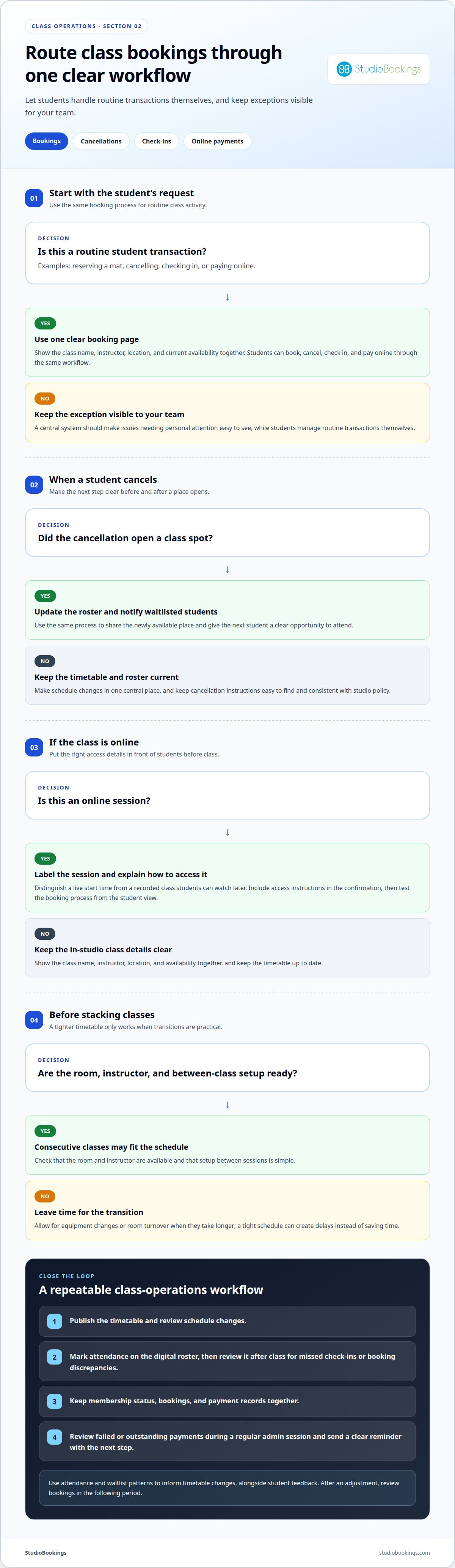
Give students one clear way to reserve a mat. A booking page should show the class name, instructor, location, and current availability together. Students can then book, cancel, check in, and pay online, reducing the need to relay every change through separate messages. Keep the timetable current so the page remains useful.
Make cancellation instructions easy to find before students book. Explain how to cancel and what happens next in plain language that matches your studio’s policy. When a spot opens, update the roster and notify waitlisted students through the same process. This avoids manually checking messages and gives the next student a clear opportunity to attend.
Use a digital roster at check-in to see who has arrived and which bookings need attention. Mark attendance as students enter, then review the roster after class for missed check-ins or booking discrepancies. This creates a consistent record without asking the instructor to manage a paper list and transfer it later.
Connect each student’s membership status with their bookings and payment records. Review failed or outstanding payments during a regular admin session, then send a clear reminder explaining the next step. Keep receipts and membership details together so staff can answer account questions without searching through email threads and spreadsheets.
Use class data to adapt the timetable to student preferences. Compare attendance and waitlists across class styles, instructors, and time slots. If an early class repeatedly fills while another has open spaces, test a schedule adjustment and review bookings in the following period. Use student feedback as context alongside attendance, not as a substitute for it.
Livestream and on-demand classes need clear booking details. Label online sessions, include access instructions in the confirmation, and distinguish a live start time from a recorded class students can watch later. Before publishing, test the booking process from the student view. Make sure the class description, access details, and cancellation steps are easy to find.
Stacking classes or appointments can reduce gaps in your timetable, but leave time for transitions. Check room availability, instructor schedules, and the work required between sessions. Consecutive classes may suit one room and instructor when setup is simple. If equipment changes or room turnover take longer, a tight schedule can create delays instead of saving time.
Bring these steps into a repeatable workflow: publish the timetable, review changes, reconcile attendance, and follow up on payment exceptions. A central system can connect bookings, cancellations, check-ins, and online payments. Choose a process that lets students manage routine transactions themselves while giving your team a clear view of issues that need personal attention.
Keep projects visible in one task board, with an owner, next action, and deadline for each. Limit your focus to 1-2 big projects and no more than 3 projects overall. For example, if you’re updating the class timetable, list decisions, tasks, and responsible people together. Move completed work off the active board so urgent studio admin stays easy to spot.
Use a calendar to separate teaching, planning, and focused admin. One example schedule is teaching Monday, Wednesday, and Friday from 9am to 1pm, then handling business tasks from 2pm to 5pm. Block the work itself, not just a vague label like “studio tasks.” Add preparation time and deadlines, then check the calendar before accepting new commitments.
Track time to see where the workday goes. Record time by category, such as teaching, student communication, bookkeeping, and planning. Review the entries to find tasks that take longer than expected or interrupt focused work. A small independent studio may need only a calendar and task list; a larger team can benefit from shared project ownership and a common view of deadlines.
Choose studio management software by mapping your actual workflow first. Write down how you schedule classes, manage memberships, take payments, and coordinate staff. Compare those needs with the software’s tools and consider whether you can manage the information together. Focus on the tasks you need to handle rather than features that won’t improve daily operations.
Define what “done” means before work begins. For a timetable update, that might mean confirming class names, instructor availability, and publishing details. Give each task a clear owner and deadline, and communicate changes that affect students or staff. This keeps an open-ended request from taking over planned project time.
Put cash-flow planning on the calendar. Review expected income and upcoming costs together, noting when memberships renew and regular bills are due. Compare those records with actual payments so you can spot a shortfall early, adjust spending, or follow up on outstanding accounts. Use the same categories each time to make changes easier to see.
Plan around your energy as well as your available hours. Schedule detailed work, such as reviewing reports or organizing the timetable, when you can concentrate. Group quick admin tasks into a separate block instead of switching between them all day. If teaching leaves you tired, save a lighter task for afterward and move complex planning to a clearer part of your schedule.
End with a regular review: check deadlines, update project owners, and choose the next priority. If new work arrives, compare its impact with active projects before adding it. This keeps your calendar realistic and gives instructors and staff clearer expectations. A task board, calendar, and time log work best when each has a distinct purpose and stays current.
A week contains 168 hours, so decide deliberately where your studio work belongs. Map teaching, preparation, administration, and recovery onto a weekly calendar. For example, group heavier teaching days from Monday through Wednesday, then reserve Thursday and Friday for business tasks. This pattern can reduce daily switching and make it easier to protect time for focused work.
Switching between tasks can take 11-30 minutes to regain focus. A quick email check between planning tasks may therefore break concentration longer than expected. Set specific email periods and avoid replying outside them unless a message needs immediate attention. During a planning block, close the inbox and keep a short list for questions to answer in the next email session.
Batch repeatable creative work instead of restarting it every week. Build playlists for a month in one focused session, then check that each class has suitable music before publishing. Apply the same approach to recurring tasks, such as preparing instructor notes or organizing supplies. A defined batch is easier to schedule and reduces repeated setup.
Delegation starts with identifying work that doesn’t need your personal judgment. Michael Hyatt’s Delegation Matrix can help you identify tasks in boxes 1 or 2 for delegation. Choose a specific task, name the person responsible, and describe the finished result. For example, delegate updating a class supply list, while you retain decisions about the studio’s teaching approach.
Give anyone taking on a task enough context to complete it without repeated questions. Share the deadline, access to the necessary materials, and a clear example of the expected result. If an instructor is updating a class description, explain what details it needs and where the final copy belongs. Review the first completed task, then refine the instructions.
Track delegated work in a shared task list instead of relying on verbal reminders. Record the owner, due date, and status, and agree on when to raise a problem. For example, a studio assistant preparing weekly supplies can flag missing items before the next teaching day. This keeps you informed without making you the default person for every small decision.
At the end of the week, review your calendar and note which tasks repeatedly interrupt teaching or planning. Move suitable work into a batch, delegate it, or give it a defined time slot. Keep the next week’s schedule realistic: reserve Thursday and Friday business blocks for the work you can’t hand off, and leave room to address genuine exceptions.
Schedule a break just like a class or staff meeting. Add a protected pause between teaching and admin, and decide what it looks like: step outside, eat without answering messages, or sit quietly away from the studio floor. A specific plan makes it easier to notice when work is crowding out recovery.
Treat personal practice as a real commitment, not a flexible task for an empty day. Choose a class on your own timetable or reserve a quiet studio slot before work begins. If a student question arrives during that time, save it for your next admin window instead of interrupting practice for a non-urgent reply.
Protect the transition into a break. Finish a defined task, leave a note with your next step, and silence social media notifications on your phone. The note helps you return without mentally carrying an unfinished schedule update. Turning off social app alerts also limits interruptions during practice and planned rest.
Plan around the energy your teaching schedule requires. After a physically demanding class, choose an easier task, such as reviewing a supply list, instead of detailed financial planning. Schedule concentration-heavy work for a time when you feel alert. This adjustment helps prevent every open gap from becoming another work session.
Make breaks workable for instructors, too. Share the class timetable and agree on who handles student questions while you step away. A designated staff member, for example, can manage an urgent room issue while routine messages wait until you return. Clear coverage lets you take a pause without staying mentally on call.
Review your calendar at the end of each week. Look for breaks repeatedly replaced by meetings, admin, or last-minute class changes. Move the protected block, clarify who can cover essential tasks, and reduce the work scheduled around it. If a break keeps disappearing, treat that pattern as a sign to adjust the workload, not as proof you need more discipline.
Personal practice can reconnect you with your students’ experience. Attend a class without teaching, observe arrival and room setup, and note what helps you feel present. Keep those observations separate from business tasks until practice ends. That boundary makes the session restorative instead of another chance to evaluate studio operations.
Start with one protected break and one personal practice block next week. Put both in your calendar, define what can interrupt them, and arrange coverage for genuine studio needs. Keep these commitments visible when planning new work. A useful schedule leaves room to teach and run the studio without treating your wellbeing as optional.
StudioBookings brings class scheduling, memberships, payments, and staff management into one cloud-based dashboard for yoga studios. It’s a practical next step if your current admin relies on scattered tools or repeated manual updates. With key operations together, you can spend less time switching systems and manage essential information more easily.
Choose a setup that fits your studio’s work. StudioBookings also provides software for Pilates and Barre, Fitness and HIIT, and Pole and Dance studios. Use it to support the operational tasks that take up too much of your week, while protecting time for teaching, breaks, and personal practice.
To explore whether it fits your studio, visit StudioBookings.
Your next improvement doesn’t need to overhaul every operation. Choose one recurring point of friction and define what a smoother process would look like. Keep the change small enough to put into practice, then review whether it leaves more room for the work only you can do.
Use reclaimed time intentionally. Protect a quiet planning block, be more available to students, or finish the day with fewer loose ends. The most practical time-saving tips for yoga studio owners fit the studio you’re running now, not an ideal schedule that never changes.
As your classes, team, and priorities shift, revisit your routines and adjust them rather than letting old habits set the pace. If you’re ready to explore a more streamlined approach for your studio, contact StudioBookings to discuss your studio. Small, thoughtful changes can create a better rhythm for your business and more space for your own practice.
Rank tasks by consequence, deadline, and who is affected if they wait. A class cancellation affecting students today takes priority over refreshing next month’s schedule. Write down urgent requests, identify the next action for each, and assign an owner when someone else can act. If two tasks seem equally urgent, prioritize student safety, class continuity, or an immediate business commitment.
Build the day around fixed commitments, then give business tasks and personal time their own start and finish points. For example, use a closing routine to record unfinished work and identify tomorrow’s first task. This helps keep admin from stretching into personal hours. Add a transition between teaching and desk work so the next block starts with a clear purpose, not leftover class demands.
Track a few indicators tied directly to your goals, such as unfinished tasks, late schedule changes, and time spent resolving booking problems. Compare the same measures from week to week, then ask whether changes improved both workflow and student experience. If a new process saves effort but creates confusion, revise it. Keep the review brief and use what you learn to choose your next adjustment.
Reduce interruptions by giving common requests a clear route and setting expectations for non-urgent questions. Direct staff to record supply needs on one shared list, for example, rather than interrupting classes or meetings. Put an “in session” signal near the office or teaching space and agree on what counts as an exception. This helps staff resolve routine issues without relying on you for every decision.
Good time management protects the attention you need for teaching, student care, and sound business decisions. Without clear boundaries, small operational interruptions can crowd out planning and affect the student experience. By reserving time to review class feedback, for example, you can spot recurring concerns and respond thoughtfully. Managing time well also helps you maintain a sustainable work rhythm as studio needs change.
The most useful time saving tips for yoga studio owners start with identifying repeated work and removing unnecessary steps. Choose one routine, such as preparing instructor information, and make it easy to follow. Then protect focused time for decisions that need your judgment. Keep personal practice visible on your calendar so efficiency supports your teaching and wellbeing, rather than simply making room for more admin.
Studio management software can handle routine tasks such as booking confirmations, waitlist updates, payment processing, and follow-up emails. Calendar and task tools help coordinate projects, while time trackers show where work goes. StudioBookings’ Yoga Studio Software includes staff management, automatic email alerts, and member profiles. Choose tools that suit your workflow, and review automated messages before they reach students.
Keep one current timetable and make every class easy to identify by title, instructor, and format. Consistent naming helps students choose the right session and reduces questions about similar classes. Online booking software can display availability and manage waitlists, while a shared staff view keeps instructors on the current schedule. Review changes in one place to prevent conflicting versions across channels.