Class booking shouldn’t depend on catching the studio at the right moment. With a Yoga Studio Mobile App for Clients, students can browse the schedule, book a class on their phone in 1-2 minutes, and receive a reminder 2 hours before class. The app gives them a straightforward way to manage bookings...

Class booking shouldn’t depend on catching the studio at the right moment. With a Yoga Studio Mobile App for Clients, students can browse the schedule, book a class on their phone in 1-2 minutes, and receive a reminder 2 hours before class. The app gives them a straightforward way to manage bookings from wherever they are.
That convenience matters to students who want to reserve a spot quickly and to studio teams handling bookings, payments, and schedule changes. A well-connected app can make the experience smoother by linking class bookings with calendars, payment options, the studio website, and CRM systems.
This guide explains how the client booking journey works, how reminders keep students informed, and how to assess the mobile experience. You’ll also see what to look for in an app that makes booking easier for clients and schedule management simpler for your studio.
• Make class booking simple by laying out a clear path from browsing the schedule to reserving a spot.
• Plan reminder messages around the class journey so students have timely prompts and booking updates.
• Consider how mobile access can help clients manage bookings without relying on studio staff for each change.
• Map how calendars, payments, the studio website, and CRM systems fit into the booking process.
• Choose an app interface that reflects your studio and feels straightforward for clients to use across their devices.
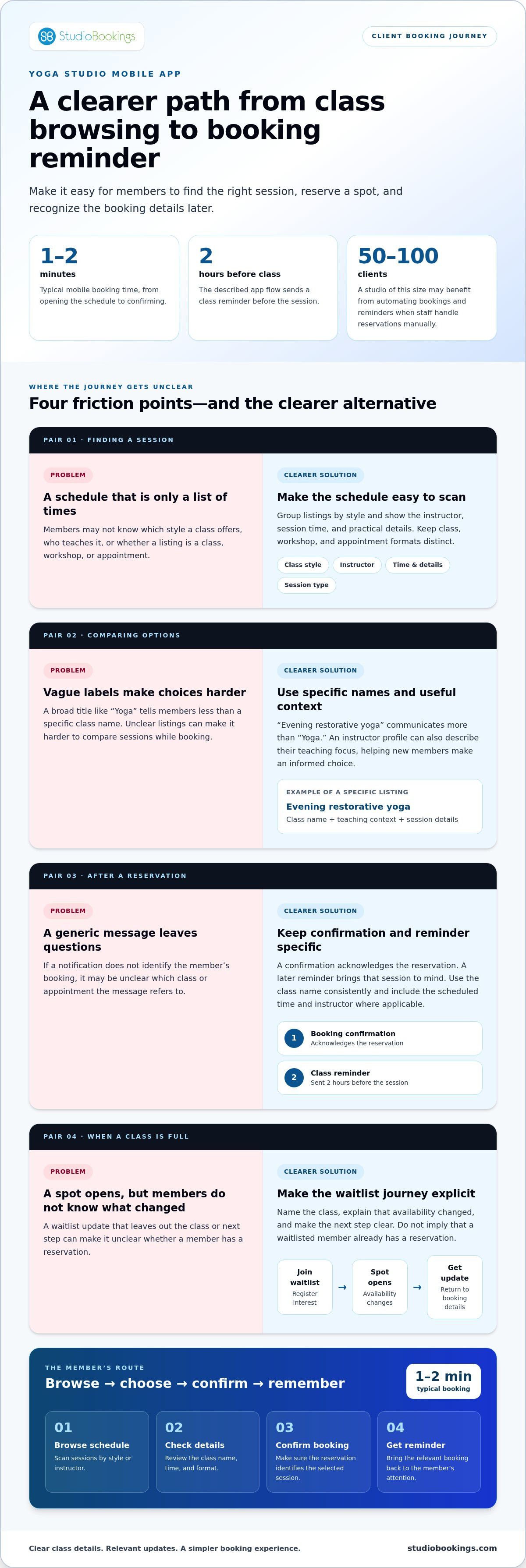
A clear booking flow helps students choose a class, check its details, and reserve a place without calling the studio. A typical mobile booking can take 1-2 minutes, from opening the schedule to confirming the reservation.
For a yoga studio, the schedule is more than a list of class times. It brings class styles, instructors, workshops, and appointments together so members can choose an option that fits their plans.
Organize listings by class style, such as restorative yoga or a more energetic flow, and show the instructor alongside each session. An instructor profile can describe their teaching focus, helping new members make an informed choice. Include the class time and practical details students need before booking. Use clear labels so members can distinguish a regular class from a workshop or one-to-one appointment.
A class library can help members browse available sessions by style or instructor. If the studio builds a custom class listing, keep its name and description specific, so students understand what the session offers. For example, a listing titled “Evening restorative yoga” communicates more than a broad label like “Yoga.” The schedule should make it easy to compare options without leaving the booking flow.
Recurring classes, workshops, and appointments may each need distinct listings and booking steps. Make the format clear from the start: weekly classes should show session details, workshops should display workshop information, and appointments should make the available time and instructor easy to identify. Review each booking path from the member’s perspective, not just on the studio calendar.
Before publishing, check each listing for the correct class name, instructor, and time. Then view the schedule as a member would and follow the booking steps through confirmation. This simple review can catch a mislabeled session or an unclear option before it creates confusion. A small studio serving 50-100 clients can benefit from automating bookings and reminders, especially when staff otherwise handle each reservation manually.
A useful schedule shows upcoming classes in a format members can scan, while reminders bring the relevant booking back to their attention. The described yoga-app flow sends a class reminder 2 hours before the session. For appointments, make sure the reminder identifies the reservation clearly, including the scheduled time and instructor where applicable.
Keep the schedule and reminder aligned: if a member books a particular class, the message should refer to that booking rather than a generic studio announcement. When reviewing the flow, book a sample class, confirm the reservation details, and check that the reminder reflects the correct session. Clear information at both steps helps members know what they reserved and when to attend.
Automated messages keep booking details visible between reservation and class. A well-planned reminder sequence helps members stay informed and avoid missing important information.
Schedule reminders at useful points, such as after booking and before an upcoming session. Each message should identify the class or appointment so members can recognize their reservation. “Your restorative yoga class is coming up” is clearer than a generic studio notification. Review messages from a member’s perspective before using them.
A yoga studio client app can send notifications and reminders to help students keep track of classes. Give each message one clear purpose: a booking confirmation acknowledges the reservation, while a later reminder brings the session to mind. Avoid unrelated announcements that make essential class details harder to find.
Match each communication method to the update. An in-app notification can flag a booking change, while branded messages reinforce the studio’s identity through its name and tone. Use consistent wording across the schedule and reminders, including the same class title in the confirmation and follow-up.
Before setting up notifications, map which updates members need and when. Keep booking information separate from general studio news, then review the complete message sequence for clarity. A concise schedule-change notice is more helpful than a broad message that leaves members unsure whether their own reservation changed.
A waitlist lets members register interest when a class is full. If a spot opens, an automated notification can tell waitlisted members that availability has changed. Name the class and explain the next step so recipients know what to do rather than assuming they already have a reservation.
Review the full waitlist journey: join the list, receive an update, and return to the booking details. Make each step clear and keep class information consistent. This matters for a popular evening flow as much as for a small workshop with limited space.
Notifications can also support loyalty when they help members stay connected to classes they value. Keep messages relevant, timely, and easy to understand; then review them alongside the booking journey. A practical test is to follow the process as a new member, from receiving a confirmation to understanding a schedule update. This reveals confusing wording or missing context before those messages reach the wider membership.
Automate routine updates while keeping the studio’s communication personal and recognizable. A branded message needn’t be long: clear class names, direct language, and a useful next step make notifications part of the member experience rather than noise.
Clients can find an app through the studio’s website, booking emails, or social profiles, then follow its download instructions. More than 70% of people search for fitness and yoga classes using a smartphone, so mobile access can support discovery and reservations.
Make the app easy to identify by using the studio’s name and clear instructions for finding it. Share those instructions where clients already look, such as the studio website or a booking confirmation email. For example, a new member can follow the website link, install the app, and sign in with their registration details.
Keep app instructions consistent across channels. If the studio updates its app information, update the website and email templates together. This gives new members a clear path from finding the studio to opening its mobile app.
On a phone, the booking path should move from the schedule to class details and then to confirmation. Members should see the selected session and instructor before booking. For rescheduling, make the existing reservation easy to find and show available alternatives without requiring another search through the full schedule.
Test the booking flow on a small screen. Try booking an evening class, returning to the schedule, and changing the reservation. Show a clear status at every step so members can tell whether the original booking is still active or has changed.
A waitlist lets clients register interest when a class is full. If a place opens, the studio can notify waitlisted members and explain how to claim it. Make clear whether the app records interest or confirms a booking: these are different steps, and members should know which applies.
A late cancellation happens after the studio’s cancellation deadline; a no-show means missing class without cancelling. Any fee depends on the studio’s stated policy, which should be visible before booking. Show the policy with the reservation details so members understand the terms before committing.
For studio teams, mobile booking also changes how routine administration flows through the day. An administrator may spend up to 3-4 hours per day manually processing bookings, confirmations, and rescheduling. Giving clients a direct route to manage reservations can reduce back-and-forth, while staff focus on schedule accuracy and member support.
Plan the launch around the member journey: provide clear instructions for finding the app, test a booking, and review the cancellation and waitlist information. Then confirm that class names and studio details match across the app and website. Consistency helps members recognize the right platform and complete each step with confidence.
Connecting the studio website, booking calendar, payment flow, and client records can reduce duplicate data entry. A clear payment process and privacy information help clients understand how their booking and payment are handled. StudioBookings includes online booking, Stripe and PayPal integration, and member profiles in one platform. If checkout fails, check the reservation and payment status before trying again, then contact the studio through its support channel if the issue remains.
A website connection can place class booking directly beside the schedule, instead of sending members through separate steps. Calendar links can help clients keep a reserved session visible alongside personal commitments. A CRM, or customer relationship management system, organizes client records and interactions. Review which details move between systems, such as class reservations and contact information, and whether staff must enter them twice.
Test a complete journey from the website to a confirmed booking, then review the calendar and member record. This can reveal gaps, such as a reservation appearing in one place but not another.
Payment processing handles a client’s payment for a class, membership, or workshop. A connected system can link the transaction to the booking, helping both the member and studio identify what was paid for. Keep the amount, selected option, and confirmation clear before and after checkout. Accurate records matter whether a client books one session or a membership.
An app label alone doesn’t guarantee safe payment handling. Clients should use the studio’s official booking route, review its privacy information, and avoid entering payment details in messages or unfamiliar pages. Make the payment provider and relevant policies easy to find, and show clear checkout details before members submit payment.
If checkout stalls, don’t immediately submit the same payment again. First check whether the booking confirmation appeared and whether the payment is complete or pending. If the details don’t match, contact the studio through its stated support channel with the class name and transaction information.
Subscriptions organize recurring access, while class packs cover a set of sessions. The right setup depends on how members attend and how the studio presents its options. Keep choices distinct at checkout: label a single-class booking separately from a recurring membership, and explain what each includes before payment.
Booking and payment records should show the same final status. A completed payment should match the correct reservation or membership. During setup, test a class booking, membership purchase, and cancellation workflow. Compare the client confirmation, calendar entry, and staff-facing record to catch any gaps before members rely on the system.
Integrations work best when each system has a clear role: the website presents options, the booking calendar tracks sessions, payment processing records transactions, and the CRM organizes client information. Map the steps before connecting systems. A simple flow is easier to maintain than overlapping records that staff must reconcile manually.
A useful interface helps members recognize the studio and complete common tasks without searching through screens. Start with the studio’s identity, then test the booking journey on the devices clients use.
At minimum, the client app should display the yoga studio’s name, logo, slogan, and colors. These details help distinguish the studio’s app from other fitness and wellness tools on a member’s phone. Keep the same identity across the app, website, booking confirmations, and class calendar. A consistent look makes each part of the experience easier to recognize.
Keep key actions easy to find. Members checking a booking should be able to locate the schedule, upcoming sessions, and account details without navigating unrelated menus. Use familiar labels such as “Schedule” and “My bookings,” and keep the instructor and class style readable beside session details.
Screen size affects how members scan details. Review the app on a smaller phone screen as well as a larger one, checking that class names, times, and booking controls remain clear. Make sure buttons are easy to tap and important details don’t disappear below crowded menus. A quick test is to ask someone unfamiliar with the layout to find a class and open its details.
Device compatibility means more than opening the app. Test sign-in, schedule browsing, booking, and confirmation on the devices and operating systems your members use. Repeat the test after interface changes to catch issues such as awkwardly wrapped text or a hard-to-reach booking button.
Use a short review checklist before launch:
Confirm the studio name, logo, slogan, and colors appear clearly.
Make the schedule, bookings, and account easy to locate.
Check class names, teacher details, and times on different screen sizes.
Test booking controls and confirmations from start to finish.
After that review, compare the app with the studio website. If the website calls a class “Gentle flow,” use that same name in the app and calendar. Consistent labels reduce uncertainty when members switch between platforms. Keep branding visible without letting decorative elements crowd the practical details clients need to book.
For a studio offering fitness alongside yoga, a clean layout also helps members distinguish different class types. Give each session a clear name and keep its details grouped together. As your schedule changes, revisit the screens members use most, rather than redesigning every page at once. You can explore studio software as you consider how app access fits your booking experience.
StudioBookings brings yoga studio management tools together, including class scheduling, membership management, payment processing, staff management, and a mobile app for members. It suits studios that want clients to book through an app while the team manages operations from one dashboard.
Choose Yoga Studio Software when your booking process feels disconnected from schedules, payments, or membership records. StudioBookings also offers software for Pilates and barre, fitness and HIIT, and pole and dance studios.
Explore StudioBookings to see how its yoga studio tools fit your booking and management needs, or visit the StudioBookings website to learn more.
Start by defining what a better booking experience should look like for your members. Consider a common journey: finding a class, reserving a place, and managing the booking later. Use it to assess whether a Yoga Studio Mobile App for Clients fits your studio’s workflow and the experience you want to provide.
Identify which parts of the current process take staff time, where clients need clearer information, and how booking tools should support daily operations. These priorities will help you choose a setup that fits your studio instead of starting with features you may not need.
StudioBookings offers software for yoga studios, alongside solutions for Pilates and Barre and Fitness and HIIT studios. If you’re ready to explore how the app could fit your studio’s workflow, contact StudioBookings to discuss your app. A thoughtful next step can make the booking experience work better for both your members and your team.
A client app connects members with the studio schedule and booking process. A student opens the schedule, selects a class, checks its details, and reserves a place. The reservation appears in the member’s account, making it easier to find later. For example, students planning a week of practice can review upcoming bookings without searching old emails.
The scope drives the cost: booking alone differs from a platform with video classes, instructor management, and other features. Native development is also estimated to take 4-9 months.
A Yoga Studio Mobile App for Clients should make it easy to find and manage sessions. Useful features include member registration, class search and filtering, booking, payment or subscription options, and reminders. A video class library can support members who want to practice outside the studio. For example, a student might filter for a preferred class style, reserve a session, then revisit the schedule later.
Clients can book and cancel through an app connected to the studio’s class schedule and cancellation policy. Before booking, look for clear class details and a visible cancellation policy. Members should be able to find a reservation and see how to cancel it. Waitlists help when a class is full, while the studio sets its own late-cancellation rules.
Clients typically select a class, pass, or membership, then complete payment through the studio app’s checkout flow. The available payment methods depend on the studio’s setup. For example, a studio may offer online payments through Stripe or PayPal, class-pass purchases, and saved payment cards. Review the selected option and its terms before checkout, especially when choosing recurring membership access rather than a single class.
Check whether the iPhone and Android versions let members complete the same core tasks, such as viewing sessions and managing bookings. A consistent experience helps clients using different devices follow the same process. StudioBookings provides free iOS and Android apps with full feature parity. Test the schedule, booking details, and account screens on both platforms to identify anything that could confuse members.
StudioBookings offers a mobile app for clients and instructors. Yoga Studio is another option, with class and meditation features, reminders, and Chromecast playback.