
A cancellation email shouldn’t be your last word with a departing member. Automated emails to prevent membership cancellations can reach members before they leave, while a clear confirmation, a thoughtful pause option, or a relevant invitation to return can keep the conversation helpful after they c...

A cancellation email shouldn’t be your last word with a departing member. Automated emails to prevent membership cancellations can reach members before they leave, while a clear confirmation, a thoughtful pause option, or a relevant invitation to return can keep the conversation helpful after they cancel. Make every message timely and personal, never pressuring.
It’s natural to want a simple email that changes a member’s mind. But a generic discount won’t address every reason for leaving. A better message acknowledges the member’s choice, clarifies what happens next, and offers a useful alternative when appropriate.
This guide explains what cancellation emails can do and how to shape messages around members’ needs. It covers examples, subject lines, re-engagement, and membership pauses, helping you create a considerate cancellation journey from start to finish.
• Make cancellation messages clear and considerate: confirm the member’s choice, invite useful feedback, and leave the door open to return.
• Tailor re-engagement messages to members’ activity and reasons for leaving instead of sending everyone the same offer.
• Keep subject lines brief and specific so members know what the email is about before opening it.
• Offer a membership pause when a temporary break may suit the member better than canceling.
• Time messages around meaningful moments, from early signs of inactivity to cancellation confirmation and later re-engagement.
A subscription cancellation email is triggered when a member cancels a paid membership. It confirms the request, explains what happens next, and may invite feedback. A useful sequence can send a confirmation first, followed by a separate survey invitation. Keep each email to three to five short paragraphs and give it one clear call to action.
Personalization makes a message relevant. Use the member’s name, account history, or classes attended. If someone mentions a schedule conflict, for example, acknowledge it instead of sending a generic discount. Ask one focused survey question, such as whether timing, billing, or class availability influenced the decision. Their answer can guide a more useful follow-up.
Situation: A regular member cancels after changing work hours. Action: Send a confirmation that recognizes their attendance history and offers a pause or a chance to return later. Include one link or button to the most relevant action. Result: The member gets a clear option related to their stated reason, and the studio receives more useful feedback than a broad sales pitch would provide.
What email automation tools support membership retention campaigns? Choose a platform that can trigger messages based on membership events and organize members by activity or cancellation reason. Connect those events to account data, then create separate workflows for cancellation confirmations, feedback surveys, and later re-engagement. Effective automated emails to prevent membership cancellations rely on accurate triggers and relevant member details, not simply sending more messages.
Tailor offers to the reason a member may leave. If they mention limited class times, a discount may not help; a schedule update could be more relevant. If feedback points to billing confusion, clarify the account or payment details instead of immediately pitching a return. For a long-term member, a personal follow-up can recognize their history and invite a reply.
What email consent and unsubscribe rules apply in the United States? For commercial email, the opt-out mechanism must remain capable of receiving requests for no less than 30 days after the original message is sent, according to Legal Information Institute, Cornell Law School. Keep promotional messages distinct from operational cancellation confirmations, and honor opt-out requests for marketing email.
How can you measure the impact of retention emails on churn and revenue? Compare cancellations and returning memberships among members who received a workflow, and track opens, clicks, and completed actions. Review results by message type and cancellation reason. For example, compare survey responses and reactivations after a pause offer with those following a general win-back message. These measures can show which steps need refinement.
Before sending, test the full path with a sample account: trigger, message, single call to action, and destination. Check that the wording reflects the member’s situation and the next step works. A respectful confirmation should stand on its own, even if the member chooses not to return.
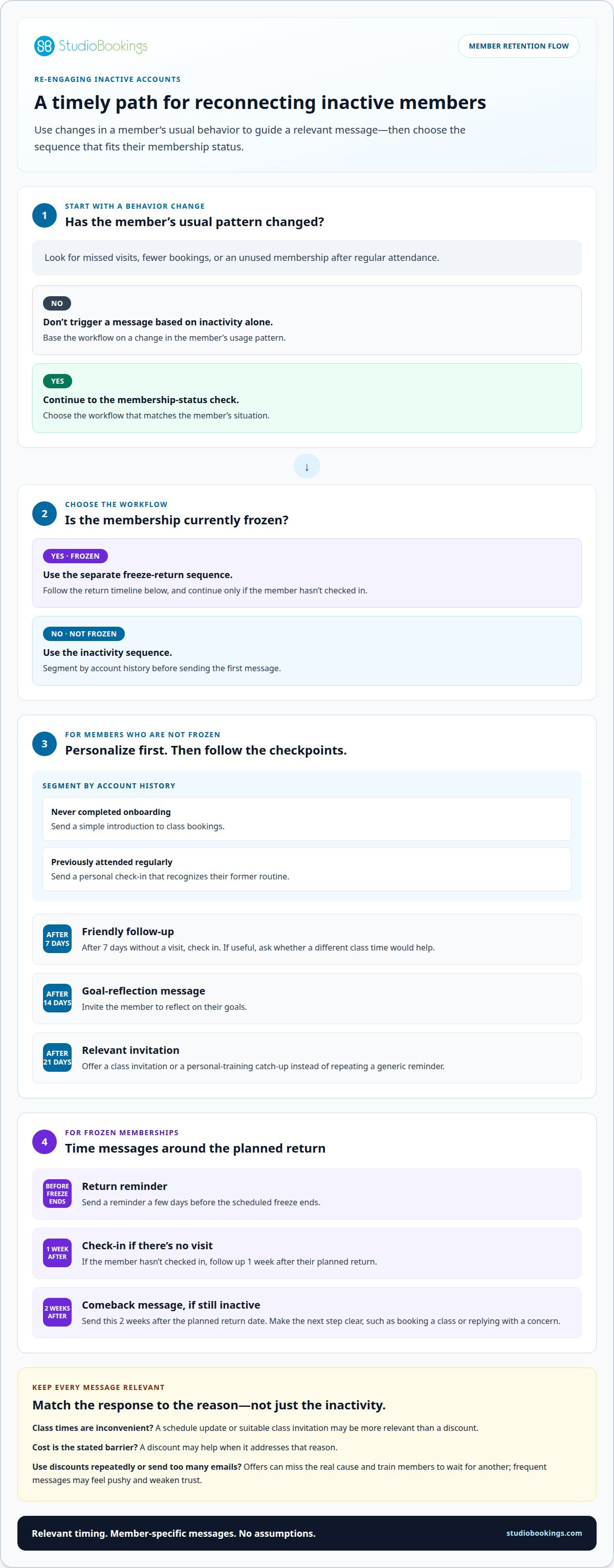
Inactivity can signal a problem before a member formally cancels. Build a workflow around attendance, account history, and membership status. A suggested sequence sends a friendly follow-up after 7 days without a visit, a goal-reflection message after 14 days, and a class invitation after 21 days. These checkpoints give you opportunities to reconnect before considering account deletion.
Segment members before sending. Someone who never completed onboarding needs a different message from a member who once attended daily. The first may need a simple introduction to class bookings. The second may respond better to a personal check-in that recognizes their former routine. This approach reflects each person’s relationship with the studio instead of treating every quiet account alike.
Situation: A member stops attending after regularly booking evening classes. Action: After 7 days without a visit, send a friendly note asking whether a different class time would help. At 14 days, invite them to reflect on their goals. At 21 days, offer a class invitation or personal-training catch-up. Result: Each message gives the member a relevant next step instead of repeating a generic reminder.
What messages and offers are most effective for retaining members? Respond to the member’s likely need with a suitable class invitation, a schedule update, or a temporary pause option. A discount may help when cost is the stated barrier, but it won’t resolve inconvenient class times or missing features.
How can membership cancellation risk be identified from customer behavior? Look for changes in a member’s usual pattern, such as missed visits, fewer bookings, or an unused membership after regular attendance. Segment members by usage history, then trigger a message based on the change, not inactivity alone.
A membership freeze needs its own sequence. Send a return reminder a few days before the scheduled freeze ends. If the member hasn’t checked in, follow up 1 week after their planned return, then send a comeback message 2 weeks after that date. Each message should make the next step clear, such as booking a class or replying with a concern.
Situation: A frozen member’s scheduled return passes without a visit. Action: Send the 1-week follow-up, then the 2-week comeback message if they remain inactive. Result: The sequence acknowledges the missed return without assuming why it happened.
What are the risks of using discount offers or frequent emails to prevent cancellations? Repeated discounts can miss the real cause and train members to wait for another offer. Too many messages may feel pushy and weaken trust. Match an offer to the reason given, honor genuine deadlines, and send occasional meaningful updates instead of repeated promotions.
Track opens, clicks, bookings, and reactivations by segment. Test the message and timing, then refine the workflow based on member response. Organized class and membership details can make those activity-based follow-ups easier to manage with studio management tools.
A subject line sets expectations before a member opens a cancellation message. Keep it clear, specific, and no longer than 40 characters. “Cancellation confirmed” tells the member exactly what the email covers. “Your membership pause option” signals an alternative without disguising the message as an urgent promotion. Avoid vague wording such as “Important update,” which gives no clue about the account action inside.
Match the subject line to the email’s purpose. A confirmation should sound neutral, while a feedback request can invite a response without suggesting cancellation depends on it. A return offer should describe the opportunity honestly. Mention the cancellation reason when appropriate, but keep private account details out of the subject line. In the body, explain billing, timing, or next steps clearly.
“Cancellation confirmed” makes the account action unmistakable.
“A quick question about leaving” signals a brief survey or reply request.
“Your membership pause option” highlights an alternative to ending the membership.
“New class times at the studio” works when schedule changes address a stated reason.
Each example should serve one purpose. Don’t use a subject line promising new class times unless the email actually includes that update. A mismatch between the subject and message can weaken trust. Keep the body focused on one action, such as confirming a choice, sharing feedback, or viewing an available option.
Situation: A member cancels after saying evening classes no longer fit their schedule. Action: Send a confirmation with “Cancellation confirmed,” then share a later update only if relevant class times change. Result: The first email respects the decision, and the later subject gives a meaningful reason to reconnect.
For retention, treat subject lines as part of the workflow, not a pressure tactic. If an offer addresses the member’s stated reason, describe it accurately. A discount subject won’t solve a missing feature or unsuitable schedule. Avoid false urgency, excessive exclamation marks, and wording that implies the member must act to complete cancellation when that isn’t true.
Test alternatives for the same type of message. For example, compare “Cancellation confirmed” with “Your cancellation request” in confirmation emails, then review opens and clicks. Keep the message content and audience consistent during each comparison. This makes it easier to see whether the subject line, rather than a different offer or audience, influenced engagement.
Situation: A feedback email receives few replies. Action: Replace a generic subject with “A quick question about leaving,” keeping the survey and audience unchanged. Result: Compare response patterns to decide whether the clearer subject belongs in the workflow. Record members’ reasons and use those insights to shape future subject lines and offers.
A member considering subscription cancellation may need a temporary break, not a permanent exit. A pause gives them another option when travel, a schedule change, or a short-term interruption affects attendance. In the cancellation flow, present it clearly alongside cancellation. Keep the member in control and make both choices easy to understand.
Send the message as soon as the member starts canceling, while the decision is still in progress. Confirm what cancellation means, then offer a pause as an alternative. Explain how the pause affects access, billing, and the return date in plain language. Don’t hide cancellation behind extra steps or imply a pause has already been applied.
Situation: A member plans to travel and expects to miss classes temporarily. Action: The cancellation message acknowledges the travel, explains the pause option, and provides a direct way to choose it. Result: The member can maintain the relationship without an irrelevant discount or having to explain the same issue again.
Build the campaign around clear choices for members. A useful sequence has three steps:
• Confirm that the cancellation request was received.
• Present the pause option with its practical effects and return process.
• Record the member’s choice and send the correct follow-up.
Match each step to the account status. If the member chooses cancellation, send the confirmation and stop pause reminders. If they choose a pause, confirm the change and explain when they can return. If they don’t respond, don’t treat silence as consent to pause. Keep the cancellation route clear.
Situation: A member says a temporary injury prevents participation. Action: Offer a pause only as a genuine choice, with clear information about billing and access during the break. Result: The member can decide whether a pause suits them, rather than receiving a sales message that ignores their reason for leaving.
Pause options can support retention, but they aren’t right for every member. Someone citing ongoing cost concerns may need a different conversation; a pause won’t solve a continuing affordability issue. A member dissatisfied with class availability needs relevant schedule information, not an automatic offer. Tailor the response to the reason given, and don’t use a pause campaign to delay a cancellation the member has clearly chosen.
Measure the campaign through member choices and subsequent activity. Track how many members select a pause, complete the return process, or proceed with cancellation. Compare those outcomes with the reasons members provide. Review billing questions and missed return dates too. These signals can show whether the pause message explains the option clearly and whether follow-up supports a useful return, without overstating its effect on revenue.
Let a member’s action, not an arbitrary batch schedule, determine timing. Send a cancellation confirmation within a few minutes of the request so the member knows it was received. If you include a survey, send it in the immediate follow-up, separate from any later return offer. This order respects the decision and collects feedback while the reason is still clear.
Start retention before cancellation becomes likely. A useful onboarding sequence sends a welcome email on day 1, digital induction and tips on day 3, and a progress check-in on day 7. Introduce the team on day 14, then request feedback on day 30. These messages help new members understand how to participate and give you opportunities to spot confusion early.
Situation: A new member joins but hasn’t booked a class. Action: Use the day 3 message to explain how to get started, then make the day 7 check-in easy to answer. Result: The member has a clear route to take part, and their response can reveal an obstacle before they decide to leave.
After cancellation, separate confirmation from re-engagement. Send a rejoin offer or class invitation 30 days after cancellation, then consider a meaningful studio update 60-90 days afterward. Use that later message only when it shares something relevant, such as an improvement connected to the member’s stated reason for leaving. Avoid sending the same discount repeatedly.
Situation: A former member left because a needed feature or class option was unavailable. Action: If that specific issue changes, send an update explaining what changed instead of a generic promotion. Result: The invitation gives the former member a concrete reason to reconsider without assuming every canceled account wants the same offer.
Build the workflow around distinct triggers: joining, reduced participation, cancellation, and a relevant improvement. Give each message a clear purpose, then stop or adjust the sequence when the member takes action. For example, remove someone who has rejoined from the former-member campaign. This prevents a win-back message from arriving after their account status changes.
Review timing alongside opens, clicks, survey replies, and completed re-joins. If a 30-day invitation earns clicks but few returns, examine whether its offer matches the cancellation reasons. If later updates receive little engagement, reconsider their relevance and timing. Change one part of the sequence at a time, so the effect of each adjustment is easier to interpret.
Turn these timing steps into a manageable workflow with membership and class management tools, so member activity and follow-ups stay organized.
Track cancellation email opens and click-throughs, then test subject lines, wording, and timing. A follow-up can also state when the subscription expires and invite feedback.
StudioBookings helps fitness and movement studios manage classes, memberships, payments, and staff from one dashboard. When you’re working to improve member retention, having schedules and membership details organized can make it easier to understand the member journey and plan thoughtful follow-ups. StudioBookings offers software for yoga, Pilates and barre, fitness and HIIT, and pole and dance studios. Choose a setup that fits your studio’s activities, then use the cancellation and re-engagement practices in this guide to shape a clearer member experience. Contact StudioBookings to discuss how its studio management software can support your business.
Retention improves when member communication reflects the experience you want to create, not just the moment someone considers leaving. A thoughtful system of automated emails to prevent membership cancellations helps your studio respond consistently while keeping every message relevant to its purpose.
Choose one part of the member journey to improve first. You might focus on helping new members settle in, making cancellation choices easier to understand, or keeping former members informed when something changes. A clear starting point helps you build a process that fits your team and members, then refine it as you learn what works for your studio.
StudioBookings supports studio management for yoga, Pilates and barre, and fitness and HIIT businesses. Talk with StudioBookings about your studio’s needs and explore a practical next step for managing memberships and member communication.
Every clear, considerate interaction can help members feel understood. Start with the change that matters most, then build from there.
Respond calmly, acknowledge the member’s choice, and explain what happens to their account. Use their name and include relevant details, such as the effective cancellation date or any remaining booked classes. Invite them to share a reason, but make feedback optional. If they mention a specific concern, such as a booking issue, pass it to the right team member instead of sending an unrelated retention offer.
Create separate sequences for new members, members whose participation changes, submitted cancellations, and former members. Give each sequence its own trigger and purpose. A cancellation survey can collect feedback, for example, while a later update can share a change that directly addresses a member’s stated concern. Set stop conditions so a reactivated member leaves former-member messages, and avoid overlapping campaigns to the same person.
Start by mapping the membership status changes your system records, such as a cancellation request or pause. Choose one trigger, then define the audience and the single action each email should invite. Write for that specific situation, add a branch for the member’s choice, and suppress unrelated campaigns. Test the workflow with sample accounts, including cancellation, pause, and reactivation scenarios.