
Strong member data security requires more than a password. For data security for fitness studio members, look for encrypted data, secure sign-in, role-based access, and clear procedures for removing access when a membership or staff role ends. Workout information also needs protection, especially wh...

Strong member data security requires more than a password. For data security for fitness studio members, look for encrypted data, secure sign-in, role-based access, and clear procedures for removing access when a membership or staff role ends. Workout information also needs protection, especially when members use shared equipment or connected consoles.
It’s easy to focus on sign-up and overlook what happens to information afterward. A safer setup limits access to people who need it, gives members clear ways to manage their data, and handles health-related information carefully. This guide explains what to look for in fitness technology, how to review access and authentication, and where workout data and data-use practices can create risks. You’ll find practical ways to assess the systems supporting your studio and its members.
• Remove access promptly when a membership ends, and review staff permissions as roles change.
• Understand what workout data connected equipment stores and how members can manage or delete it.
• Look for encryption and multi-factor authentication to help protect accounts and stored information.
• Limit sensitive data to staff who need it, and keep connected equipment off open guest networks.
• Collect only the information needed to deliver member benefits, and use it in a clear, responsible way.
A canceled membership should trigger a clear access change, not leave an old credential active. Update the member’s status in the membership record, then remove or disable the linked door permission. If the systems are connected, the membership platform can maintain the current status while the access-control system applies the corresponding permissions. This helps prevent an outdated record from continuing to open a door.
Build the change process around specific events: cancellation, expiration, account reactivation, and a member’s request to view or delete information. The California Consumer Privacy Act gives members the right to see and delete their data. Keep a simple record of each request, its status, and the action taken. For correction requests, direct the reported error to the staff member responsible for keeping that record accurate.
Review staff access separately. Remove permissions promptly when a coach or employee leaves, and audit remaining accounts regularly. Give each role access only to the doors and hours it requires. Individual member credentials help distinguish visits and allow access to be revoked separately, unlike a shared fob. Keep offices containing computers or member records restricted to staff.
For 24/7 facilities, access controls should support remote administration, real-time activity monitoring, automatic lock schedules, and reliable backup power. To reduce tailgating, avoid shared credentials and train staff to watch for members entering behind someone else. Review activity records when an entry seems unusual, and make sure door schedules match the facility’s operating hours.
Plan separately for internet outages. Members can always exit from inside during an outage, but whether a reader continues admitting members depends on the system and its power supply. Find out how the system handles outages and protects credentials. Choose access controls with encryption, secure authentication, and role-based permissions. For connected systems, confirm that credentials and member data are encrypted both in storage and during transmission.
Installation budgets vary by project. Door count and existing equipment affect the total, so plan access hardware costs separately from membership software.
These checks make data security for fitness studio members part of routine account management. When a membership ends, revoke entry and update related records. If it resumes, restore only the permissions needed for the active account.
Store member records in protected systems, keep only the information you need, and securely delete records when they are no longer required. If a breach occurs, follow a documented response plan, assess the affected records, and notify people through appropriate channels. Membership agreements should explain how information is collected, used, stored, retained, and deleted.
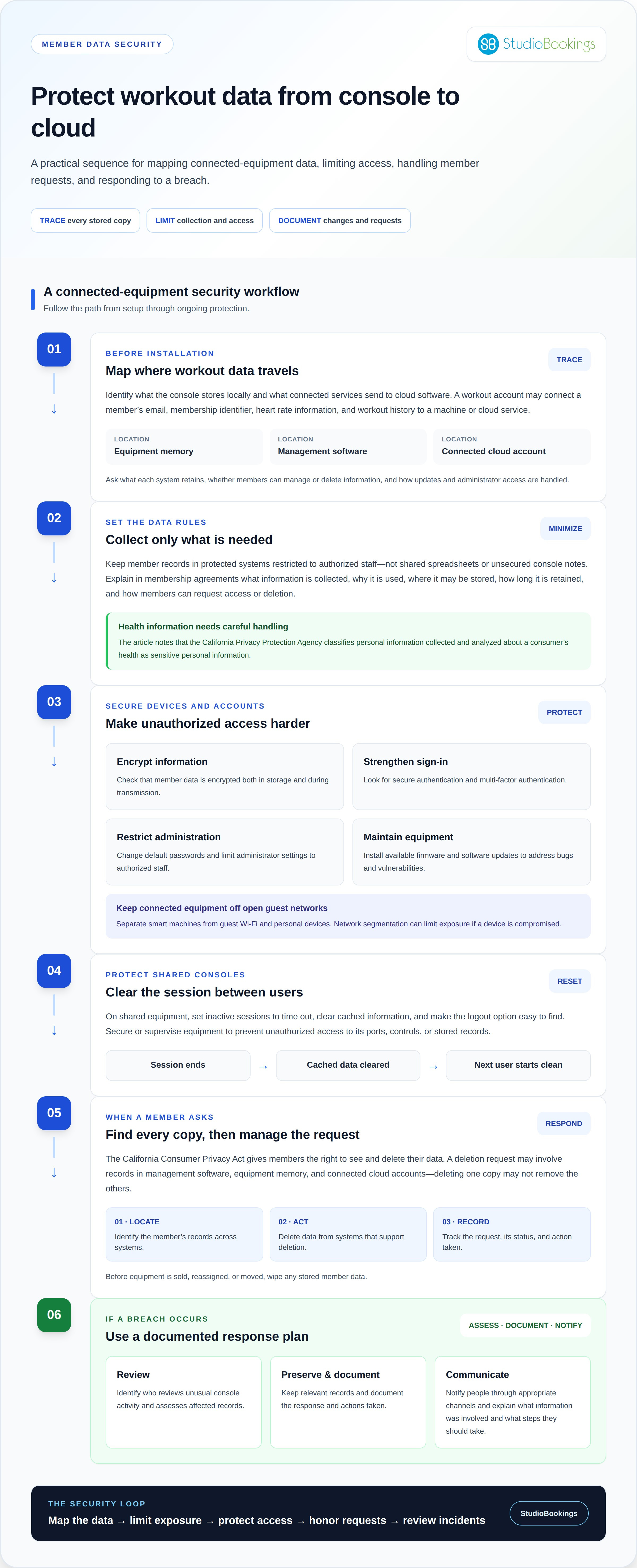
Cloud-connected equipment sends or stores information through internet services rather than keeping every record only on the machine. A workout account may link a member’s email, membership identifier, heart rate information, and workout history to a machine or cloud service. The California Privacy Protection Agency classifies personal information collected and analyzed about a consumer’s health as sensitive personal information.
Before installing connected equipment, establish what data the console stores locally and what integrations send to cloud software. Ask whether information is encrypted in storage and during transmission, how long each system retains it, and whether members can manage or delete their data. Confirm how the equipment provider handles software updates and administrator access. Mapping where records travel helps staff identify which systems hold each copy.
Secure record management means limiting access, setting retention practices, and removing personal information when it is no longer needed. Keep membership records in systems restricted to authorized staff rather than shared spreadsheets or unsecured console notes. Identify whether each record is stored in management software, equipment memory, or a connected cloud account. Deleting one copy may not remove the others.
For a deletion request, identify the member’s records across these locations, delete data from systems that support deletion, and record the completed action. Before equipment is sold, reassigned, or moved, wipe any stored member data. On shared consoles, set inactive sessions to time out, clear cached information, and make the logout option easy to find. These steps help prevent the next user from seeing workout details left behind.
Connected equipment can expose information beyond its member-facing screen. Change default passwords, restrict administrator settings to authorized staff, and install available firmware and software updates to address bugs and vulnerabilities. Keep smart machines off open networks used by guest Wi-Fi and personal devices. Network segmentation can limit exposure if a device is compromised. Secure or supervise equipment to prevent unauthorized access to its ports, controls, or stored records.
A breach plan should identify who reviews unusual console activity, assesses affected accounts, and communicates with members. Preserve relevant records, document the response, and clearly explain what information was involved and what steps affected people should take. Membership agreements should describe the workout data the studio collects, why it is used, where it may be stored, how long it is retained, and how members can request access or deletion. Explain these practices plainly, including relevant equipment or cloud integrations.
Encryption and strong sign-in controls protect member information in storage, during transmission, and when staff access systems. Review these safeguards across equipment, management software, and connected services.
Encryption transforms information into a form that cannot be readily read without the required key. It protects records both in storage and as they move between a device, studio software, and a connected service.
Ask equipment and software vendors whether member data is encrypted in storage and during transmission. Include workout history, account details, and information passed through integrations. Map where each type of record travels and identify which systems hold copies. If a device sends information to a cloud service, encryption should protect both the transfer and the stored record. Encryption can reduce exposure if data is accessed improperly, but it does not replace secure logins or restricted permissions.
Secure authentication verifies that the person signing in is authorized. It matters because shared logins make it harder to identify who accessed member records or changed a setting.
Give each staff member an individual account instead of sharing administrator credentials. Match access to job responsibilities, and remove accounts when they are no longer needed. Apply the same approach to equipment dashboards, membership records, and surveillance systems. A coach who only needs class information should not automatically have access to sensitive member records. Review sign-in logs for unfamiliar activity and investigate unexpected access promptly.
For members using a shared console, make the sign-out option easy to find and ensure inactive sessions end automatically. A visible logout option helps prevent the next person from opening another member’s account. Authentication controls should also protect remote administration, since those tools can change settings without someone beside the device.
Multi-factor authentication asks users for another proof of identity beyond a password. It matters because a stolen staff password alone should not provide an easy way into studio systems.
Enable this protection for administrator accounts and other sign-ins that can expose member records or change access. Choose a process staff can use consistently, and ensure every authorized user enrolls their own account. If a staff member receives an unexpected sign-in request, they should deny it and report the activity through the studio’s security process.
Review authentication settings when staff roles change, and remove access that is no longer needed. Test account recovery so legitimate users can regain access without shared credentials. Together, encryption and multi-factor authentication provide separate safeguards: encryption protects the data itself, while multi-factor authentication makes unauthorized entry harder.
Protect membership and payment systems with restricted permissions, regular reviews, software updates, and a clear incident response plan. Apps, wearables, booking platforms, and vendors can each create another route to member information.
Cybersecurity combines safeguards that protect accounts, devices, and records from unauthorized access. It matters because a compromised staff login can expose member details or let someone change account information.
Give each staff member access only to the records and platform functions required for their role. Review administrator credentials regularly, remove unused accounts, and revoke access the day an employee leaves. Replace default passwords on connected equipment, and keep smart machines separate from guest Wi-Fi and personal devices. Network segmentation can limit exposure if a connected device is compromised.
Keep systems current. Audit software and equipment regularly to identify vulnerabilities, apply available security updates, and document how updates are handled. Train staff to end sessions, report unusual console activity, and know who may use administrator settings. A written incident plan should identify who investigates, preserves relevant records, and communicates with affected members. HIPAA regulations may apply when a gym shares data with healthcare providers, according to the U.S. Department of Health and Human Services.
Apps, wearables, booking software, and vendor integrations may collect or transfer member information between systems. This matters because a weakness in one connected service can put data held elsewhere at risk.
Start by mapping which tools receive member logins, workout history, health information, email addresses, or membership identifiers. Identify the vendor and the systems that store or process each type of data. Review administrator access, update practices, and whether information is encrypted in storage and during transmission. Keep only the integrations needed for studio operations, and remove access for tools no longer in use.
Staff training matters too. Teach employees to recognize unusual device behavior, avoid sharing credentials, and report unexpected requests for member information. For example, a wearable connected to a member account may link activity data with identifying details. Limit access to staff who need those records, and explain clearly what the studio collects and how it uses the information.
If a system shows suspicious activity, follow the incident plan instead of deleting logs or restarting devices before they are reviewed. Record what happened, which systems were involved, and what actions followed. This record helps the studio assess exposure, address weaknesses, and give affected members clear information.
Collect and store only the information needed to provide member services. This principle keeps studio operations focused and reduces the amount of personal information held across equipment, apps, and networks.
Fitness studios may handle names, email addresses, membership identifiers, workout history, resistance preferences, heart rate information, and app connections. The data collected depends on the equipment and services a member uses. The California Privacy Protection Agency classifies personal information collected and analyzed about a consumer’s health as sensitive personal information.
Identify a specific purpose for each data field before collecting it. An email address may support membership communications, while workout history may help a member track progress. If a field has no clear role in providing a service, remove it from sign-up forms or device settings. Avoid collecting health details simply because a connected machine can capture them.
Clear purposes also help prevent secondary use. Heart rate information gathered during a workout shouldn’t quietly become a marketing profile. Explain which information supports studio operations, who can access it, and whether an integration shares it with another service. Members should be able to understand these practices without decoding technical language.
Ask only for information needed to create and manage the membership.
Explain what workout details a connected console records and how members can manage or delete them.
Limit access to records required for each role, rather than giving every employee the same view.
Keep only connections that support a defined studio function, and remove access when a tool is no longer used.
Set retention periods according to the purpose of each record. Keep active membership details available for membership operations, but don’t retain old workout information without a continuing reason. Establish a process for locating records in management software, equipment memory, and connected services. When information is no longer needed, remove it from each relevant location and document the deletion.
Ethical data use also means giving members meaningful control. Make data-management options easy to find, explain how to request access or deletion, and avoid burying the explanation in a long agreement. For example, a shared treadmill should not leave the previous user’s workout details visible to the next person. Automatic session timeouts and clear logout controls help prevent that exposure.
Review these practices whenever studio operations change, such as when you add wearable integrations or install connected equipment. Update policies to reflect actual data flows, then tell members what changed and why. Specific explanations build trust more effectively than broad promises. A focused approach to data security for fitness studio members starts with collecting less and using each record only for its stated purpose.
StudioBookings provides fitness and HIIT studio software to manage class schedules, memberships, payments, and staff from one dashboard. When your studio wants to bring these operations together, managing membership records and day-to-day administration in one place can simplify the work. StudioBookings also provides yoga, Pilates and barre, and pole and dance studio software.
Choose tools that fit your studio’s operations, then apply the security practices covered here to the systems and information you manage. To see how StudioBookings can support your studio, start a free trial or contact the team.
Make member privacy part of everyday operational decisions, not a one-time technology project. When your studio adds classes, connected equipment, or digital tools, review how those changes affect the information members share. A brief review whenever a system or process changes can help keep your policies aligned with your actual operations.
Ongoing attention is central to data security for fitness studio members. Clear ownership helps too: decide who maintains access settings, reviews data practices, and updates staff when procedures change. When these responsibilities are part of everyday operations, security is easier to maintain as your studio grows.
If you’re considering software to manage studio operations, explore how StudioBookings may fit your needs. Contact StudioBookings to discuss your needs.
Every thoughtful improvement helps build a more trusted member experience. Take the next step at a pace that works for your studio.
Look for encryption, secure sign-in options, role-based permissions, and clear controls for managing member records. Consider how technology handles everyday situations: can a shared console end an inactive session, and can staff remove a former employee’s access? Ask how connected equipment stores workout details and how members can manage or delete their information. These checks help assess data security for fitness studio members across software and equipment.
Limit access to staff who need specific records, and give each person an individual account instead of sharing credentials. Keep connected equipment updated, change default passwords, and separate smart machines from guest Wi-Fi. Staff should know whom to alert if a console behaves unexpectedly and how to preserve relevant activity records. A written incident plan can clarify who investigates, assesses affected information, and communicates with members if a breach occurs.
Applicable rules depend on the studio’s location and data relationships. The California Consumer Privacy Act gives members rights to see and delete their data. HIPAA may apply when a gym shares data with healthcare providers, according to the U.S. Department of Health and Human Services. State privacy requirements can differ, so studios should identify the laws that apply to their operations and the information they handle.
Collecting health information alone doesn’t determine whether HIPAA applies. The U.S. Department of Health and Human Services says HIPAA regulations may apply when a gym shares data with healthcare providers. For example, a studio involved in exchanging data with a provider should consider how that relationship affects its responsibilities. Protect health information regardless, and assess the studio’s role in each specific data-sharing arrangement before setting data practices.
Share only the personal and health details needed to join or use the studio’s services. Use a unique password for each member account, and sign out after booking on a shared device. Read the membership agreement’s privacy information, especially its explanations of data collection, storage, and deletion. Use the studio’s designated payment process rather than sending card details by email or message, and review account activity for unfamiliar transactions.