A Barre Class Scheduling System should make two things clear: how long each class runs and how studio resources are used. Class duration shapes the timetable, while booking and attendance records help you understand class demand and membership activity. The details available depend on the system and...

A Barre Class Scheduling System should make two things clear: how long each class runs and how studio resources are used. Class duration shapes the timetable, while booking and attendance records help you understand class demand and membership activity. The details available depend on the system and how your studio tracks operations.
It’s easy to focus on class times and overlook the work around them. When durations are unclear or booking records are difficult to interpret, planning the timetable becomes harder.
This guide explains how class length fits into a barre timetable and what booking and attendance records can show. You’ll also learn how scheduling software can bring schedules, memberships, and studio administration together, and which tools can support daily operations.
• Set each class’s duration to reflect the session plan, then build your timetable around those time blocks.
• Use recurring sessions to create a consistent schedule, and review it when instructors, room availability, or demand changes.
• Make booking, cancellation, and rescheduling steps easy to understand so clients know how to manage their reservations.
• Write cancellation and no-show policies in plain language, including the deadlines and any booking consequences.
• Set capacity according to the room and class format, and use a waitlist process to manage interest when a session fills.
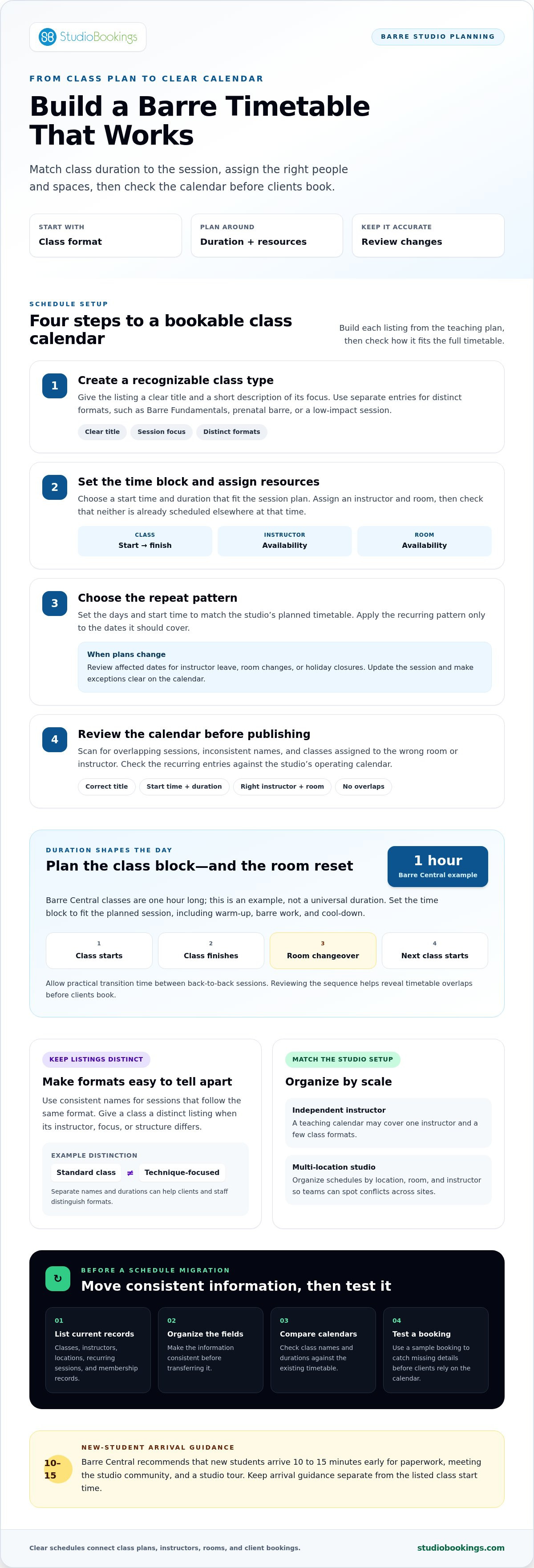
Class duration is the scheduled time between a session’s start and finish. Barre Central classes are one hour long. That offers a concrete example, not a universal rule for every barre class. In a scheduling system, duration determines how a class appears on the timetable and when the room and instructor are available again.
Set the time block to match the session you plan to teach. A class with a warm-up, barre work, and a cool-down needs enough time for each part. If your studio offers different formats, create a separate schedule entry for each. For example, list a standard class and a technique-focused session with distinct names and durations. This makes the booking page clearer and helps staff distinguish between formats.
Allow practical transition time between back-to-back sessions. The timetable should account for room changeovers as well as teaching time. Review the day in sequence: class start, class finish, room reset, and the next class start. This can reveal overlaps before clients book. Instructor availability and room schedules also determine which time blocks will work.
An independent instructor’s schedule may cover one teaching calendar and a few class formats. A multi-location studio needs schedules organized by location, room, and instructor so teams can spot conflicts across sites. In either case, a Barre Class Scheduling System should show each session’s duration alongside its start time.
Privacy and payment security depend on the information collected and the payment process used. Give staff access according to their roles, and keep payment handling within the studio’s chosen workflow. Clear booking forms also help collect only the details needed to manage classes.
Payment and membership workflows depend on the connections supported by the scheduling platform. Before setup, map the client’s journey from choosing a class to applying an eligible membership or completing payment. This shows which records need to connect and where staff may need to take a manual step.
To migrate schedules and client data, first list current classes, instructors, locations, recurring sessions, and membership records. Organize the information into consistent fields before transferring it. Compare the new timetable with the existing one, including class names and durations, then test a sample booking. This helps catch missing details before clients rely on the new calendar.
A class schedule is the calendar of sessions clients can book. A recurring session is a class entry that repeats on selected days or dates. To build one, start with the studio’s teaching plan, then add each class, instructor, room, start time, and duration. For example, list a one-hour barre fundamentals class separately from a technique-focused session.
Set up the schedule in a practical order. First, list the formats the studio teaches, such as barre basics, prenatal barre, or a low-impact session. Match each format to an instructor and suitable room. Then choose start times that fit instructor availability and leave time to prepare between sessions. Clear class names help clients distinguish similar options when browsing.
Use a recognizable title, such as “Barre Fundamentals,” and add a short description of the session’s focus.
Select the instructor and room for that class. Check that neither is already scheduled elsewhere at the same time.
Choose the days and start time that match the studio’s planned timetable. Apply the pattern only to the dates it should cover.
Scan the schedule for overlaps, inconsistent class names, and sessions assigned to the wrong room or instructor.
Recurring entries reduce repetitive calendar setup, but review them whenever plans change. If an instructor takes leave or a room becomes unavailable, update the affected session rather than expecting clients to notice a mismatch. A holiday closure, for example, may interrupt a repeating class. Check the affected dates and make the exception clear on the calendar.
Keep the timetable consistent so clients can recognize regular sessions. If “Barre Fundamentals” appears under different names on different days, clients may not know whether the classes follow the same format. Use distinct listings when the instructor, focus, or structure differs. Consistent names also help staff compare attendance by class type.
Before publishing, review the calendar from a client’s perspective. Confirm that each listing has the correct title, start time, instructor, and room. Check recurring sessions against the studio’s operating calendar. Scheduling software is useful when its entries reflect the real timetable, not just the initial setup. Revisit it when teaching plans or room assignments change.
Studios can also use class listings to set expectations before a session begins. Barre Central recommends arriving 10 to 15 minutes early for new students to complete paperwork, meet the studio community, and tour the studio. Including clear arrival guidance with the relevant class information can help new clients plan for those steps without confusing arrival time with the listed class start time.
Keep relevant guidance easy to find for each class. If session details change, check that arrival instructions still match the listing. Clear information helps clients prepare and gives instructors and staff a timetable that reflects both the class schedule and what new students should do beforehand.
Online booking lets clients reserve a barre class through a studio’s digital schedule. A clear booking flow shows the class details before clients commit. Each listing should identify the class, instructor, location, and booking options. For example, someone choosing between “Barre Basics” and “Barre Strength” can compare descriptions before selecting a session.
A booking confirmation records that a reservation has been made. After a client selects a class, the system can display the reservation details and update the class roster. A useful confirmation names the session and its scheduled time. Clients should also be able to find upcoming bookings in their account without searching through old messages.
Cancellation removes a client’s reservation before class. Studios set the policy, including any cancellation deadline and what happens to a class credit or membership booking. Show those terms before clients reserve. When a client cancels, update the roster so staff can see the current attendance list.
Rescheduling moves a reservation from one class to another. Some systems let clients cancel one booking and select a different session; others offer a direct change option. A simple client workflow looks like this:
• Open the account’s upcoming bookings and select the barre session.
• Choose the cancellation or change option shown for that reservation.
• Select another available class when rescheduling, then review the updated details.
• Check the confirmation to ensure the correct session appears in the account.
Memberships and class packages affect how a booking is paid for. A membership may include access to eligible sessions, while a package tracks visits through credits. Make the applicable option clear before checkout. For instance, a client with a class package should be able to see whether the selected barre session can use that package before confirming.
Online reservations give the studio a central record of bookings and changes. Staff can use the class roster to prepare for a session and see who remains booked after cancellations. Clear policy wording is important: if cancelling affects a credit or membership, explain the consequence in the booking flow, not only on a separate policy page.
Before publishing online booking, test it as a client. Reserve a class, find the confirmation, then try cancelling and rescheduling. Check that the roster updates and the displayed policy matches the studio’s rules. A barre scheduling system is easier to use when clients can complete each action without guessing what happens next.
A cancellation policy explains how clients can give up a booked place and what happens afterward. A no-show policy explains what happens when a client remains booked but doesn’t attend. Each studio sets its own terms, so explain them on the booking page before clients reserve a barre class.
Cancellation deadlines specify when a client can withdraw without a stated consequence. A studio might set a cutoff before class and apply its stated rule to later cancellations. Show the deadline beside the booking option, not only in a separate policy document. For example, a client whose work plans change can see whether cancelling affects a membership booking or class credit.
A late-cancellation consequence is what happens when a booking is cancelled after the studio’s cutoff. Under the studio’s policy, the booking may still count against a class package or membership allowance. Explain the rule directly, then show it during booking and in the client’s account. This helps clients understand the impact before confirming.
A no-show is a missed class without a recorded cancellation. Studios may treat no-shows differently from timely cancellations because the reserved place was unavailable to other clients. State the consequence clearly, including whether the booking uses a credit or affects an included membership session. Keep the wording consistent on the booking page, confirmation, and account history.
To make the policy practical, decide how to handle each booking situation:
Specify whether the class credit returns or the membership booking is released.
Explain whether the reservation remains chargeable under the studio’s terms.
State how the missed session affects the client’s package or membership.
Explain how clients will learn about a cancelled class and what happens to their reservation.
Apply the rules consistently in the schedule and reservation records. When a client cancels, staff should see the updated status instead of an active booking. If an instructor cancels a session, distinguish that from a client cancellation. Clear records help staff answer questions about a specific class without relying on memory.
Review the policy from a client’s perspective before publishing. Clients should be able to find the deadline, understand the consequence, and know where to cancel. For example, check that the cancellation option is easy to find from an upcoming booking. Scheduling software should make the studio’s rules visible and record each change accurately.
Class capacity is the maximum number of clients allowed to book a session. A scheduling system tracks reservations against the limit set for each class. For example, a studio can set the limit for Barre Fundamentals based on its room layout, equipment, and teaching format. The cap should reflect the available space and the instructor’s ability to guide the group, not simply the number of people who want to attend.
A waitlist is a queue for clients hoping to book a class after all available places are taken. When a Barre Strength session reaches capacity, a waitlist lets interested clients register without creating extra confirmed bookings. The studio sets the rules for joining and what happens when a space opens. Clear terms prevent clients from assuming a waitlist place guarantees attendance.
Capacity settings should match each class, room, and format. A session using barre equipment may need a different limit from a mat-based class in the same studio. Review the room setup and class plan before setting the cap. If classes share a room, account for the equipment and layout each format requires. One default limit can overlook these differences and leave some sessions crowded or underused.
Before using a waitlist, decide how to offer an opening. The studio might contact the next person in the queue and set a response window, or use a system rule to offer the place automatically. Tell clients how quickly they need to respond and whether the place passes to the next person. A client who cannot attend should remove their waitlist request to keep the queue current.
Match the booking cap to the room, equipment, and teaching format.
Tell clients whether joining a waitlist confirms a booking or only records interest.
State how clients learn about an available place and how they accept it.
Compare confirmed bookings with capacity before the instructor prepares the room.
Use booking and attendance records to review whether each cap still fits. If Barre Fundamentals regularly fills while another format has open places, compare class times, room setup, and client demand before changing limits. Distinguish attendance from reservations, since a booked client may not attend. This helps staff assess actual room use and make informed schedule adjustments.
Choose a studio scheduling system that supports clear capacity settings and waitlist workflows for barre classes.
StudioBookings offers Pilates and Barre Studio Software to bring class schedules and daily administration together. Its cloud-based platform lets you manage classes, memberships, payments, and staff from one dashboard. If you’re replacing separate tools or organizing barre bookings alongside membership records, StudioBookings can support that workflow.
Use it to bring routine studio tasks into one place while keeping your class timetable and business administration connected. StudioBookings also offers Yoga Studio Software, Fitness and HIIT Studio Software, and Pole and Dance Studio Software for other studio formats.
Explore how StudioBookings can support your barre studio’s scheduling needs at studiobookings.com.
Start by defining what better class operations would look like for your studio. Consider which tasks take the most attention, where staff need clearer information, and what clients should be able to manage themselves. Use those priorities to assess whether a Barre Class Scheduling System fits how your team works today and where you want to go.
StudioBookings offers Pilates and Barre Studio Software, alongside Yoga Studio Software and Fitness and HIIT Studio Software. If you’re ready to explore how studio management software could support your workflow, contact StudioBookings to discuss scheduling. Bring your priorities and questions to the conversation, then decide what feels like the right next step for your studio.
A well-chosen system can give your team a clearer foundation for daily work. Start with what matters most and build from there.
A barre class scheduling system should connect bookings with everyday studio administration. Look for online waivers, class notes and health reminders, and attendance and revenue reports to review activity. Staff permissions and instructor management can clarify who handles each task. For example, clients can complete waivers online, staff can record attendance, and owners can review reports. A mobile app also makes booking and studio information easier to access.
Payment and membership workflows depend on the connections supported by the scheduling platform. Map the booking journey to identify which records need to connect and where staff may need a manual step.