
A monthly staffing review helps keep your rota aligned with how members use the gym. Effective employee scheduling best practices for gyms include reviewing attendance, peak-hour changes, and labor costs monthly, then examining staffing and payroll data quarterly to spot inefficiencies and adjust co...

A monthly staffing review helps keep your rota aligned with how members use the gym. Effective employee scheduling best practices for gyms include reviewing attendance, peak-hour changes, and labor costs monthly, then examining staffing and payroll data quarterly to spot inefficiencies and adjust coverage.
A schedule needs to work for both your team and your members. But a rota built around old habits can leave busy sessions short-staffed and quieter periods overstaffed. Regular reviews give you a clearer basis for deciding where staff time is needed. Availability rules and a consistent schedule-publishing routine can also reduce last-minute clashes.
This guide covers how to plan shifts around demand and staff skills, set expectations for availability and shift changes, and align scheduled hours with payroll records. You’ll also learn how to assess staffed hours, manage open shifts, and use attendance patterns to refine coverage over time. The aim is a schedule that’s easier to manage and better matched to your gym’s day-to-day rhythm.
• Set a clear weekly schedule-publishing routine and give staff a deadline to update availability before shifts are assigned.
• Map attendance across representative weeks to spot busy periods, quiet sessions, and coverage needs by role and skill.
• Use consistent rules for shift swaps, open shifts, time-off requests, and schedule updates so changes don’t rely on ad hoc messages.
• Capture scheduled hours, breaks, and class time accurately to make payroll records easier to reconcile.
• Compare staffing patterns with attendance and wage data to identify where coverage can be adjusted.
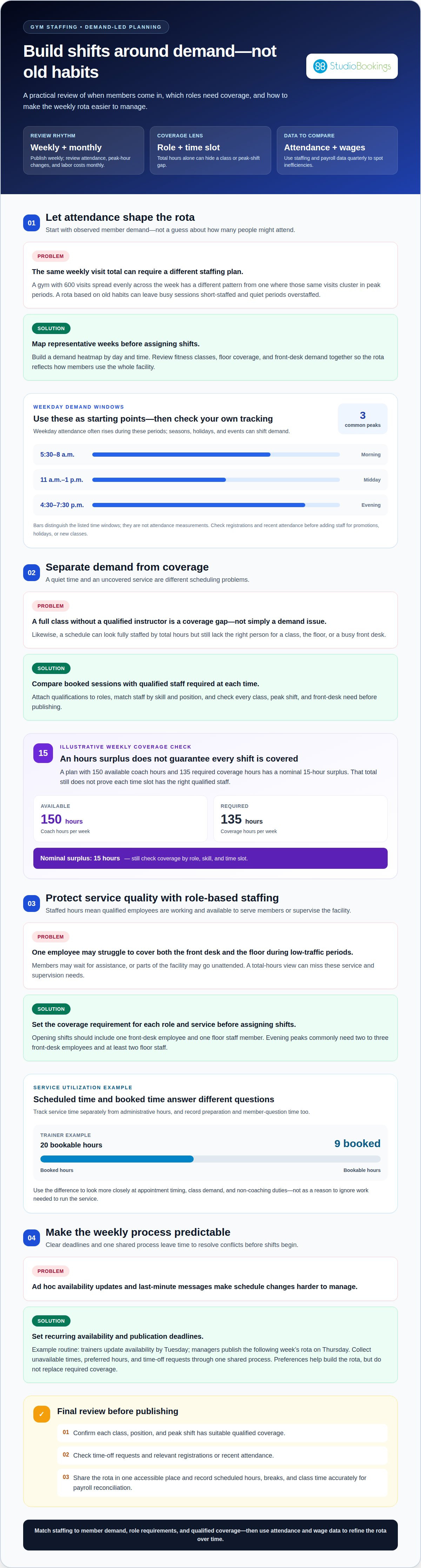
A reliable weekly rota starts with member demand, not a guess about how many people might attend. A gym with 600 weekly visits spread evenly needs a different staffing plan from one with the same visits concentrated in peak periods. Track attendance across several representative weeks and build a demand heatmap by day and time. This makes patterns visible before you assign shifts. Include fitness classes, floor coverage, and front-desk demand in the same review, so the schedule reflects how members use the whole facility.
Set recurring deadlines for staff availability and schedule publication. For example, trainers can update their availability by Tuesday, and managers can publish the following week’s rota on Thursday. This leaves time to resolve conflicts before shifts begin. Ask staff to record unavailable times, preferred hours, and time-off requests through one shared process. Preferences help you build a workable schedule, but they don’t replace required coverage. If several trainers prefer evening shifts, use attendance and class-demand patterns to distribute those shifts fairly.
Forecast regular peaks and special events separately. Weekday attendance often rises from 5:30 to 8 a.m., again from 11 a.m. to 1 p.m., and from 4:30 to 7:30 p.m. Use your own tracking to see whether these patterns fit your gym. A promotion, holiday, or new class may change bookings for a particular shift. Check registrations and recent attendance before adding staff. If a session has weak bookings, consider moving or consolidating it before treating the issue as a staffing gap.
Separate demand from coverage. Low attendance can mean a quiet time slot, while a full class without a qualified instructor is a staffing problem. Compare booked sessions with the staff required to run them. For example, a team with 140 coach hours available each week may still lack coverage for a specific class format or peak shift. Assign staff by skill and position, not just total hours. Keep required qualifications attached to the role, so a general availability match doesn’t leave a class or front desk uncovered.
Use a final review before publishing: confirm each class, position, and peak shift has suitable coverage; check time-off requests; then share the rota in one accessible place. According to Bureau of Labor Statistics, fitness trainers’ median annual wage was $47,160 in May 2025. That figure reinforces why scheduled hours deserve careful attention, but member demand and role requirements should guide each shift. A clear weekly process makes operational decisions easier to explain and gives staff a predictable way to plan their time.
Staffed hours are the periods when qualified employees are working and available to deliver services or supervise the facility. During low-traffic periods, one employee may struggle to cover both the front desk and the floor. Members may wait for assistance, or parts of the facility may go unattended. A two-person closing policy can also give staff support while they complete closing tasks.
Schedule coverage around attendance, not just opening hours. Weekday demand often rises from 5:30 to 8 a.m., from 11 a.m. to 1 p.m., and from 4:30 to 7:30 p.m. Use these as starting points, then compare them with your gym’s attendance patterns. Seasons, holidays, and special events can shift class bookings or facility use, so review demand before repeating a standard rota.
Measure coverage by role and time slot. A shift can look fully staffed by total hours but still lack a qualified instructor for a class or floor coverage during a busy period. Compare the qualified staff available with the qualified staff required to see whether coverage may be short. For example, a weekly plan with 150 available coach hours and 135 required coverage hours has a nominal 15-hour surplus. That total doesn’t prove every shift is covered.
Track service time separately from administrative hours. For each service, compare scheduled hours with bookable and booked hours. One trainer-demand example has 20 bookable hours, with nine booked. This can prompt a closer look at appointment timing, class demand, and non-coaching duties. Record time spent preparing and handling member questions, too. Otherwise, a schedule may miss work needed to run each service.
Define the qualified coverage each service requires before assigning shifts. List the roles and skills needed for every class, then match them against staff availability. A substitute qualified for one format may not be suitable for another. Keep two to three certified substitute instructors for each class format so an absence doesn’t automatically leave that service uncovered. Clear role requirements and qualified backup coverage are key employee scheduling best practices for gyms.
Build cross-training around specific roles, not assumptions. A front-desk employee may learn routine floor duties, while an instructor should cover only formats they’re qualified to teach. Opening shifts should include one front-desk employee and one floor staff member. Evening peaks commonly need two to three front-desk employees and at least two floor staff. Before approving each rota, compare required coverage with the availability of qualified employees.
This comparison also helps you assess safety and supervision. Check whether staff can monitor member areas, respond to requests, and maintain front-desk coverage at the same time. A four-hour gap in peak coverage doesn’t mean you need to overstaff the entire day. One useful employee scheduling best practice for gyms is to target staffing to the roles and periods that need coverage.
Set a clear process for every shift change, from an employee’s request to manager approval. Staff should be able to check schedules, request time off, trade or pick up shifts, and update their availability in one accessible system. Keep the approved rota as the source of truth. If a member-facing class changes, notify affected instructors and front-desk staff directly, then update the schedule so facilities teams aren’t relying on outdated messages.
Work blocks matter as much as paid hours. One example compares Coach A, who works six paid hours across a seven-hour span, with Coach B, who works six paid hours across a 13-hour span. The second pattern can keep someone tied to the facility for much longer, even though paid hours match. Before assigning a split shift, group duties into useful blocks and consider whether separate staff can cover the gaps. Include class duties, preparation, breaks, and transitions in the plan.
Make open shifts visible, with the details employees need to decide whether they can take them: role, required skills, location within the gym, and hours. A practical process is straightforward: publish the opening, let eligible staff request or claim it, then have a manager approve the match. Availability and preferences can help identify potential cover, but qualifications determine who can teach a class. Make the final assignment visible to the team and update the rota once it’s approved.
For a last-minute callout, follow the same process rather than relying on informal messages. Notify the manager, identify the uncovered role, and offer the shift to qualified staff who are available. Set written callout and swap rules so employees know who approves changes and how to report them. If a shift includes several tasks or breaks, record each part clearly. This helps the replacement understand the duties, not just the start and finish times.
Use demand-based shift templates as starting points, not fixed rules. A coach scheduled at 5:30 AM, 6:30 AM, 11 AM, 5:30 PM, and 6:30 PM may have a fragmented day; use booking patterns to decide whether those duties belong in fewer, more practical blocks. Create separate templates for ordinary weeks, holidays, and new class launches. Tell staff when each template changes. If classes are canceled or under-covered more than once a month, reconsider whether manual scheduling is working. Track overtime assignments, too, and apply consistent rules when distributing extra shifts.
A staff schedule becomes a payroll record only when actual time is captured accurately. Record each instructor’s shift start and end, breaks, and class hours, then compare those entries with scheduled duties. Integrated scheduling software can reduce manual data entry by using schedule details. Before approving payroll, managers should resolve discrepancies, such as a class that ran longer or a missed clock-out.
Standardize the process with written policies for schedule changes, callouts, payroll cutoffs, and communication. Staff need to know how to report a missed punch and when approved hours are sent to payroll. Set a consistent process for managers to review exceptions, including substitute coverage and overtime. Clear, repeatable steps make payroll easier to process and help employees understand how their hours are recorded.
Pay records should give employees the information they need to understand their earnings. Provide clear digital documentation showing hours, rates, and deductions. For example, an instructor should be able to distinguish class hours from other paid work in the same payroll record. Keep the schedule, time entries, and pay documentation aligned. If a correction is needed, record what changed and why instead of silently replacing the original entry.
Payroll rules depend on location, so apply the relevant wage, overtime, and tax requirements where the gym operates. The scheduling example describes overtime pay as 1.5 times the regular rate. Use documented rules to allocate overtime opportunities consistently, and apply callout policies evenly. Scheduling software can help enforce those rules and distribute overtime fairly, while managers remain responsible for reviewing exceptions and payroll results.
Use software that connects shift planning with time tracking and payroll preparation. A useful workflow links an approved staff schedule to clock-in records, break entries, and class assignments. Payroll information can then be exported to accounting or bookkeeping tools, reducing duplicate entry during reconciliation. Before each payroll cutoff, review missing punches, unscheduled hours, and differences between planned and actual work. Train new hires on the scheduling and payroll systems so they follow the same process from their first shift.
Changing systems needs its own checks. Run the old and new payroll processes in parallel for one full pay period, then compare hours, deductions, and totals before relying on the new workflow. This can reveal mismatches while both records are available. To assess coach utilization, compare paid hours with classes delivered, assigned duties, and available bookable time. An instructor with an open class slot may be handling member support or administrative work, so review the task before treating that time as unused. A clear connection between scheduling and payroll makes those hours easier to explain and plan.
Review actual attendance, peak-hour changes, and labor costs monthly. Then review staffing and payroll data quarterly to identify inefficiencies and adjust coverage. Use the monthly check to catch recent changes in demand, such as a class filling up or a formerly busy period becoming quieter. The quarterly review gives you time to compare longer-term patterns and assess whether schedule changes are working. Use the same categories each time, including role, scheduled hours, attendance, overtime, and wage data.
Low attendance doesn’t always mean low demand. Compare class bookings with check-ins, cancellations, waitlists, and member feedback before reducing shifts. An underbooked class may be scheduled at an inconvenient time, while a full class with members turned away points to unmet demand. Consider changing the class time or format before reallocating staff hours. Also look for members who haven’t checked in for more than three weeks. That pattern may call for member engagement rather than a staffing cut.
Separate service demand from staffing conflicts during your review. Compare attendance by day, time, class, and staff role with the schedule. If evening sessions repeatedly fill while daytime classes remain quiet, consider shifting coverage between those periods. Check absences, shift swaps, and overtime alongside attendance. A coverage issue may stem from staff availability, not a rise in member demand. Record the reason for each adjustment to help managers distinguish recurring patterns from one-off events.
Review wage and payroll data just as carefully. Compare scheduled hours with paid hours, overtime, and classes delivered. Investigate recurring differences, such as frequent extra time after a particular class or overtime concentrated in one role. Don’t rely on total labor figures alone. Break them down by shift and service to see whether a change improved coverage or simply moved costs elsewhere. Document each decision, the pattern behind it, and the result to assess at the next review.
Use quarterly reviews to decide whether manual processes still suit the gym. Frequent rota corrections, repeated conflicts, or payroll discrepancies can signal that the workflow needs attention. Gyms with documented role definitions and performance KPIs report 31% lower management overhead time than gyms without them. Clear measures also help managers explain staffing choices and track whether adjustments support attendance and service. For a more organized way to manage schedules alongside studio operations, explore fitness studio scheduling tools.
StudioBookings helps fitness businesses manage classes, memberships, payments, and staff from one dashboard. If scheduling changes create extra admin or make it harder to align staff plans with classes, a shared management system can bring those tasks together. The software supports different studio types, including fitness and HIIT, yoga, Pilates and barre, and pole and dance studios.
Use it as a next step when you want your class schedule and staff management in one place, alongside core studio operations. You can explore whether StudioBookings fits the way your gym plans shifts and manages classes. Contact StudioBookings to discuss your studio’s scheduling needs.
Strong employee scheduling best practices for gyms aren’t a one-time fix. They develop as you learn which routines help your team plan confidently and which manual steps keep causing friction. Choose one improvement to make next, such as clarifying shift updates or bringing staff planning closer to class management. Use your next review to decide what to adjust.
If your current process spreads scheduling and studio administration across separate tools, StudioBookings can bring them together. The software supports yoga, Pilates and barre, and fitness and HIIT studios, with scheduling, staff management, memberships, and payments managed from one dashboard. Choose a setup that supports the way your gym operates without adding needless complexity.
Discuss your scheduling setup with StudioBookings and explore a practical next step for your team.
Review staffing and payroll data monthly, with a broader quarterly check for recurring patterns. In each monthly review, compare actual attendance with class bookings and scheduled coverage by role. For example, if a class fills but several members cancel late, check attendance records before changing instructor hours. A quarterly review can show whether schedule adjustments are improving service or shifting gaps to another day or team.
Choose the simplest method that gives managers reliable schedules and accurate records. A manual rota may suit a small team, while a dedicated scheduling app can help manage availability and shift requests. An integrated platform is useful when you want scheduling and other studio operations together. Manual scheduling may work for gyms with fewer than 15 staff; consider purpose-built software if the rota takes more than five hours a week to build or fix.
Staffed hours are the times qualified employees are working and available to perform their assigned duties. They differ from opening hours: a facility may be open while only a limited team is on duty. For example, an instructor’s scheduled class time counts toward class coverage but doesn’t automatically provide front-desk coverage. Track hours by role so the schedule reflects which services employees can actually support.
The 70/30 rule is a suggested staffing mix of 70% part-time employees and 30% full-time employees. Treat it as a planning benchmark, not a formula that determines coverage for every gym. Part-time staff can help cover varying demand, while full-time staff can provide continuity across core operations. Assess your class timetable, service needs, and staff availability before deciding whether that mix suits your team.
Match staff roles to expected activity, then schedule overlapping shifts where classes, check-ins, and handoffs coincide. During quieter periods, maintain the coverage needed for essential duties rather than removing every staff member. For a busy evening class changeover, stagger instructor and front-desk shifts so arriving members can check in while the outgoing class finishes. Use actual attendance to refine the pattern over time.
Compare attendance and bookings across representative weeks, then map demand by day, time, and service. Record recurring classes, seasonal changes, holidays, and special events separately. If a class has low bookings, consider changing its timing or format before adding staff. If bookings exceed available places or sessions repeatedly lack qualified coverage, revise the relevant shift instead of increasing hours across the entire day.
Suggested staffing levels vary by membership and shift. For gyms with 200–600 members, one recommendation is four to six front-desk staff rotating across peak shifts, plus one to two full-time floor staff during peak hours. For 600–1,500 members, the suggested front-desk team is six to ten staff. Personal trainer coverage should reflect booked sessions, class demand, and required qualifications, rather than a single gym-wide ratio.
Set clear allocation rules before assigning less popular shifts. Rotate weekends, holidays, and closing duties among employees qualified for each role, while recording approved availability and time-off requests. When several people want the same shift, use a consistent method, such as rotating access or taking recent assignments into account. Track overtime opportunities too, so extra hours don’t repeatedly go to the same employees without a clear reason.