
A full class isn’t necessarily double-booked. Double booking happens when the same instructor, room, or other shared resource is assigned to overlapping sessions; setting that resource’s asset quantity to 1 prevents it from being booked twice at the same time. If you’re working out how to prevent do...
A full class isn’t necessarily double-booked. Double booking happens when the same instructor, room, or other shared resource is assigned to overlapping sessions; setting that resource’s asset quantity to 1 prevents it from being booked twice at the same time. If you’re working out how to prevent double booking classes, start by separating that scheduling conflict from overbooking, which means accepting more bookings than a class or resource can accommodate.
When schedules overlap, students can get frustrated and staff can end up untangling the calendar. The solution is a clear booking process, not more time spent checking reservations by hand. This guide explains how to distinguish accidental double bookings from intentional overbooking, set booking limits and resource rules, and use buffer time between sessions. You’ll also learn how to catch conflicts before they reach your front desk, keeping the schedule clear for instructors and students.
• Identify which instructor, room, or other shared resource could be assigned to overlapping classes, then build your schedule around its availability.
• Choose buffer times based on the real transition needs between sessions, so one class doesn’t run into the next.
• Look for the process gaps behind conflicts, such as outdated availability or bookings handled in separate places.
• Separate overlapping resource assignments from classes that accept more participants than their intended capacity.
• Set consistent booking rules for each class and resource to reduce manual fixes and make scheduling easier to manage.
Double booking happens when two classes claim the same resource at overlapping times. That resource might be an instructor, a studio room, or equipment needed for both sessions. A group class accepting several students is different: those bookings share one class slot rather than competing for separate resources.
• Map each class to its required staff and resources. For example, if one instructor is scheduled to teach yoga and Pilates at the same time, the instructor is double-booked even if the classes use different rooms. Treat shared staff availability like room availability: a resource with an asset quantity of 1 can’t be booked for overlapping sessions.
• Keep staff availability current in one scheduling process. If instructors use Outlook calendars for personal or work commitments, record unavailable times in the booking system too, or pass along changes promptly. A calendar entry that staff can see but the booking process can’t account for may leave a class open when its instructor is unavailable.
• Set booking deadlines and no-show rules before opening registration. Define when students can book or cancel, then explain in your booking terms what happens after a missed class. Apply the same policy across classes, and use reminders or staff follow-up to keep attendance records accurate instead of changing availability informally.
• Set a capacity limit for each class and decide how you’ll manage a full session. A group class can be configured for up to 10 bookings per slot, while a smaller session can use a lower limit that matches its space and format. A waitlist can offer a place when someone cancels; release that place through a consistent process so two students aren’t promised the same opening.
• Use one booking record across every channel, then review how updates reach it. Google Calendar or Calendly synchronization doesn’t always prevent double bookings, so don’t rely on a calendar view unless reservations update the same availability record. Choose booking software with resource conflict checks, capacity controls, and timely availability updates. Audit existing schedules by comparing class times, instructors, and rooms; correct overlaps, then contact affected students and assign a valid alternative.
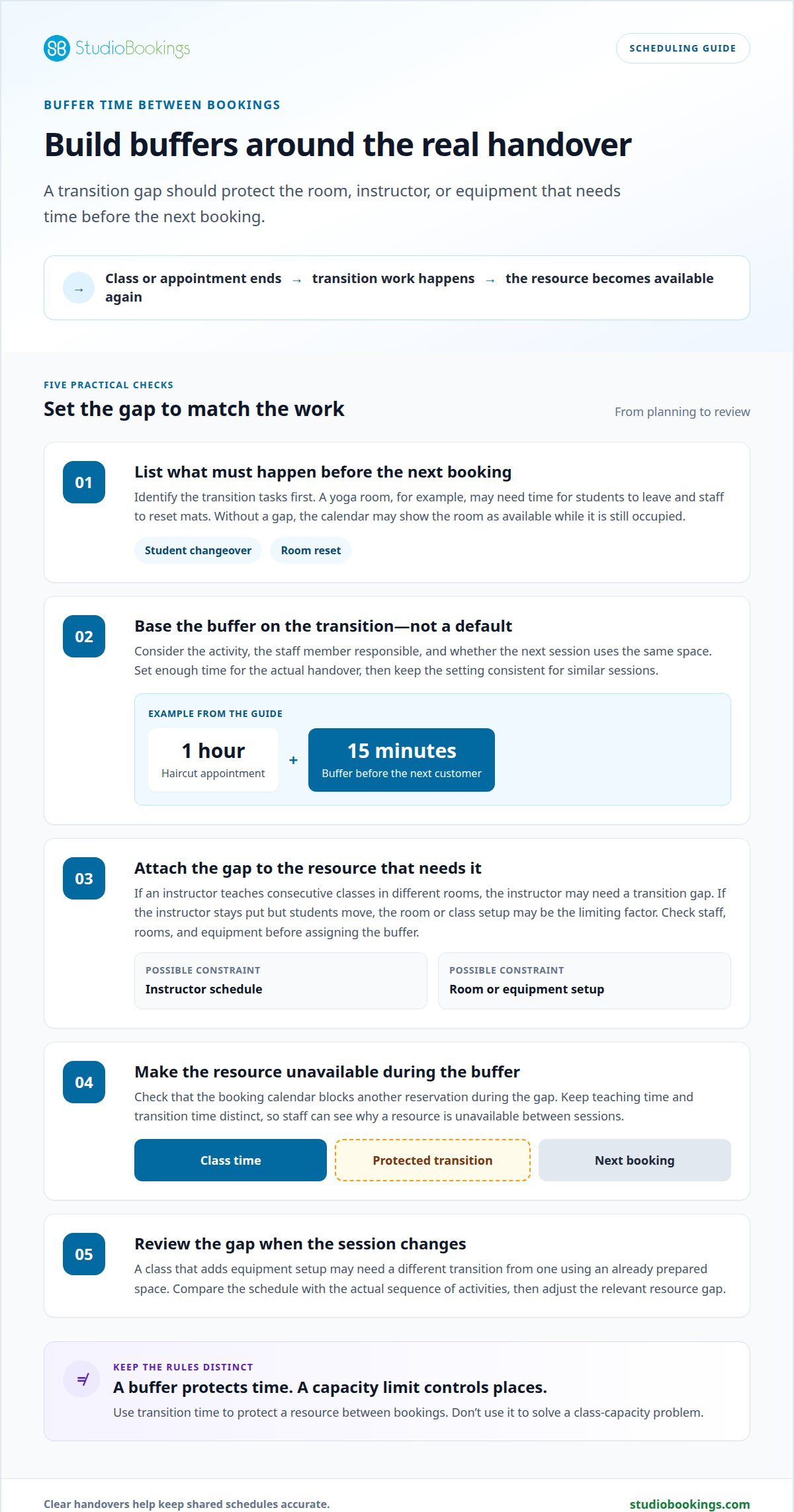
• Add a buffer when one session needs time before the next can use the same room, instructor, or equipment. The buffer blocks that resource for transition tasks, even after the class itself has ended. For example, a yoga room may need time for students to leave and staff to reset mats. Without a gap, the calendar can show the room as available while it’s still occupied. Decide what must happen before the next booking, then schedule enough time for those tasks.
• Base each buffer on the work between sessions, not a convenient default. A one-hour haircut appointment can use a 15-minute buffer before the next customer books. For a class, the transition may involve clearing equipment, cleaning shared surfaces, or changing the room layout. Consider the activity, the staff member responsible, and whether the next class uses the same space. Set the buffer long enough for the required handover, then keep it consistent for similar sessions.
• Apply the buffer to the resource that needs it. If an instructor teaches consecutive classes in different rooms, their schedule may need a transition gap. If the instructor stays put but students move between rooms, the room or class setup may be the limiting factor. A buffer attached only to the wrong calendar entry won’t protect the resource that needs preparation. Review each class’s room, equipment, and staff assignments before choosing where the gap applies.
• Check how the booking calendar treats buffer time. The gap should make the affected resource unavailable for another booking, rather than simply appearing as a note. For example, if a room needs resetting after class, the next reservation should begin only after the reset period ends. Keep class duration and buffer time distinct so staff can see teaching time and transition time separately. This also helps explain why a room is unavailable between sessions.
• Review buffers when class formats or room use change. A session that adds equipment setup may need a different transition from a class using an already prepared space. Compare the schedule with the actual sequence of activities, then adjust the relevant resource gap. Don’t use buffers to solve unrelated capacity problems: a transition gap protects time between bookings, while a class limit controls how many students can reserve a place. Clear settings make each rule easier for staff to apply.
• Trace each conflict to the resource two sessions need at once. A room may be assigned to separate classes, or one instructor may appear on both rosters. For example, a calendar can show a yoga class and a dance class at the same time without making the shared-room conflict obvious. Record the instructor, space, and required equipment for each session. Then compare assignments across overlapping class times to find the actual collision.
• Look for schedule changes that didn’t reach every person or record involved. An instructor may trade a shift, a room may close for maintenance, or a class time may change. If staff update one calendar but the booking record stays unchanged, students can still reserve the old slot. Assign responsibility for recording each change, and have that person update the schedule and notify affected staff. A clear handoff prevents a small edit from becoming a live conflict.
• Check whether a spreadsheet has become the booking system by default. Spreadsheets can be copied, edited by several people, or left open with outdated availability. That makes it harder to tell which version reflects the latest reservation, and manual edits can overwrite useful details. If you continue tracking schedules in a spreadsheet, use a shared record with clear ownership. Review changes promptly, and compare the current roster with the class calendar before confirming adjustments.
• Distinguish an accidental overlap from intentional double booking. In a medical office example, two patients scheduled with the same physician at 10:00 AM create a conflict. Clinics may intentionally double-book to fill schedule gaps, maximize physician productivity during peak hours, reduce the impact of no-shows, or improve patient throughput. A class schedule has different constraints: one instructor cannot teach two sessions at once. Don’t treat a deliberate booking policy as a safe scheduling rule for every shared resource.
• Review how one conflict can trigger another. If a class moves to a different room, that room may already host another session. If a substitute instructor is added without removing the original assignment, both staff members may appear booked. Build a routine for tracing the full chain: class time, room, instructor, and equipment. When you find a mismatch, correct the schedule first, then update the roster and communicate the change. This keeps staff from acting on different versions.
Intentional double booking has costs beyond the timetable. Repeatedly overbooking can increase the workload for front-desk teams resolving scheduling conflicts and create stress for instructors and employees who must constantly adjust schedules. Include these effects in the decision instead of assuming that filling an open slot has no operational consequences.
When reviewing a recurring overlap, consider whether the policy is creating repeated adjustments instead of solving a one-time gap. Keep the decision tied to the resources involved, and check whether staff can carry it out without conflicting assignments. If the same schedule needs constant correction, revisit the booking choice and clarify who is responsible for resolving any resulting conflict. This helps distinguish a deliberate exception from a pattern that needs attention.
• Classify the problem by checking whether bookings overlap or exceed capacity. Double booking means two reservations claim the same resource at the same time, such as one instructor assigned to simultaneous sessions. Overbooking means accepting more reservations than the class or resource is intended to accommodate. The distinction matters: a timetable conflict needs a schedule correction, while excess reservations need a capacity decision. For example, a room assigned to two classes has an overlap, even if both classes have open spaces.
• Check whether a class has multiple places available before treating concurrent reservations as a conflict. A group class can be configured for up to 10 bookings per slot. Those reservations are not automatically double bookings when they refer to separate participant places in one class. The instructor, room, and equipment still need to support the scheduled session. Compare the class limit with each shared resource’s availability, rather than assuming every additional student creates a scheduling collision.
• Treat any deliberate decision to accept bookings beyond a planned limit as overbooking. The intention may be to keep a class full when cancellations or missed attendance occur, but the class can still exceed its usable capacity if everyone arrives. That’s different from assigning one instructor to two simultaneous classes. Before accepting extra reservations, define the maximum number of students the session can serve safely and comfortably, and make sure the booking process reflects that limit.
• Assess the practical effects before making intentional overbooking a routine policy. It can lengthen customer waits and frustrate clients, weakening confidence in the business. Staff may spend more time resolving conflicts while instructors and employees repeatedly adjust schedules. Over time, those disruptions can damage the business’s reputation. These effects differ from the direct conflict of double-booking a room, but both problems can arise from unclear scheduling rules.
• Choose the correction that matches the error. For a double-booked instructor, move one class or assign an available instructor; changing student capacity won’t resolve the overlap. For overbooking, stop taking reservations at the intended limit, or manage cancellations through a waitlist. Then check the class record, room assignment, and instructor schedule together. This final review helps prevent a capacity adjustment from hiding a separate resource conflict in the calendar.
• Set each class’s booking limit to match its format. Setting Maximum Bookings Per Slot to 1 allows only one booking for each time slot. That setting suits a private session or another service with one available place. A group class needs a limit that reflects its intended capacity instead. Apply the rule to the specific class, then review its instructor, room, and equipment assignments. A booking limit controls reservations for a slot; it doesn’t resolve two classes competing for the same instructor.
• Block a staff member across every class they teach. For example, a tutor booked for Math from 3:00 PM to 4:00 PM can’t take another subject booking during that time. The same principle applies to studio instructors: availability must account for all their scheduled sessions, not just one class type. Knowing how to prevent double booking classes starts with treating each instructor’s schedule as shared across every class they teach. Make changes in the shared scheduling record so availability stays consistent.
• Build recurring classes from a consistent schedule, then handle exceptions as changes to individual dates. A weekly class can reserve the same room and instructor each week, while a holiday closure or instructor absence affects only the relevant occurrence. Before changing a recurring time, review the full series for room and staff conflicts. Update the affected date and tell booked students, rather than creating a second class entry that remains open beside the original.
• Use a single source of truth for reservations arriving through different channels. If a student books at the front desk while another books online, both reservations need to reduce the same available capacity. Google Calendar or Calendly synchronization doesn’t always prevent double bookings. Make the booking record authoritative, and have staff enter manual reservations promptly. For studios learning how to prevent double booking classes, a shared record helps keep availability aligned across booking channels.
• Test the booking path before opening a class to students. Create a sample reservation, then try booking the same slot again through the other available channel. Confirm that the system blocks a second reservation when the limit is one, and that recurring dates show the right instructor and room. Remove test entries before registration opens. If your schedule needs a clearer shared process, streamline class scheduling with software designed for studio bookings.
Intentional double booking shouldn’t become a routine way to manage demand. Repeated overbooking can lead to longer waits and frustrate clients, reducing their confidence in the business. Consider the effect on people who have already reserved a place before allowing overlapping bookings, and don’t treat extra reservations as a substitute for accurate capacity limits.
If intentional overlap is permitted for a particular situation, keep it limited and make sure the booking record reflects the arrangement. Review whether clients are waiting longer or losing confidence, and reduce overlapping reservations if those problems arise. Clear, consistent availability helps prevent preventable uncertainty while keeping expectations aligned with the capacity shown in the schedule.
StudioBookings helps studio owners manage class schedules, staff, memberships, and payments from one cloud-based dashboard. When it’s difficult to track overlapping instructor or room assignments across separate calendars, a shared scheduling process can make availability easier to manage.
Use the platform to organize classes and staff schedules alongside the rest of your studio operations. StudioBookings offers software for yoga, Pilates and barre, fitness and HIIT, and pole and dance studios. It’s a practical next step when manual updates make it harder to keep class availability consistent.
Want to simplify class scheduling at your studio? Contact StudioBookings to discuss your needs.
A reliable booking process should keep pace as your timetable changes. As you add classes, adjust instructor availability, or open new booking channels, make scheduling rules part of your regular operations. Decide who records changes, how updates reach staff, and how to handle exceptions. This gives your team a consistent way to keep availability current instead of relying on last-minute fixes.
If you’re deciding how to prevent double booking classes as your studio grows, choose a system that brings class scheduling and day-to-day management together. StudioBookings offers Yoga Studio Software, Pilates and Barre Studio Software, and Fitness and HIIT Studio Software. These options help studios manage class schedules alongside other core operations.
Take the next step at a pace that suits your studio. Contact StudioBookings to discuss scheduling and explore whether its software fits your class management needs. A clearer process can give your team a better foundation for the schedule ahead.
Double bookings often start with a mismatch between the published class schedule and the records staff use to assign instructors or rooms. A duplicated class listing can also leave two reservable sessions in the same space. For example, copying a class template without changing its room may create overlapping reservations. Review new or edited listings against the master timetable before making them available to students.
A booking system can check a slot’s current availability when a student submits a reservation, then update the record before accepting another booking. For example, if two students try to claim the last place, the system should confirm one reservation and show the other that the slot is full. This works when bookings and capacity draw from the same current record rather than separate calendars.
Update the original reservation’s status first, then release its place or resource for new bookings. For a rescheduled student, move the reservation to the new class and restore availability in the original class as one coordinated change. This keeps the student from unintentionally holding two places. If a waitlist is active, offer the newly open place through that process, then make sure the roster reflects the accepted booking.