A Reformer class can be fully booked and still be poorly managed. A booking system for reformer Pilates machines should cap each class at the number of available Reformers: a studio with eight machines can take up to eight bookings. It should also make cancellations, waitlists, and class passes easi...
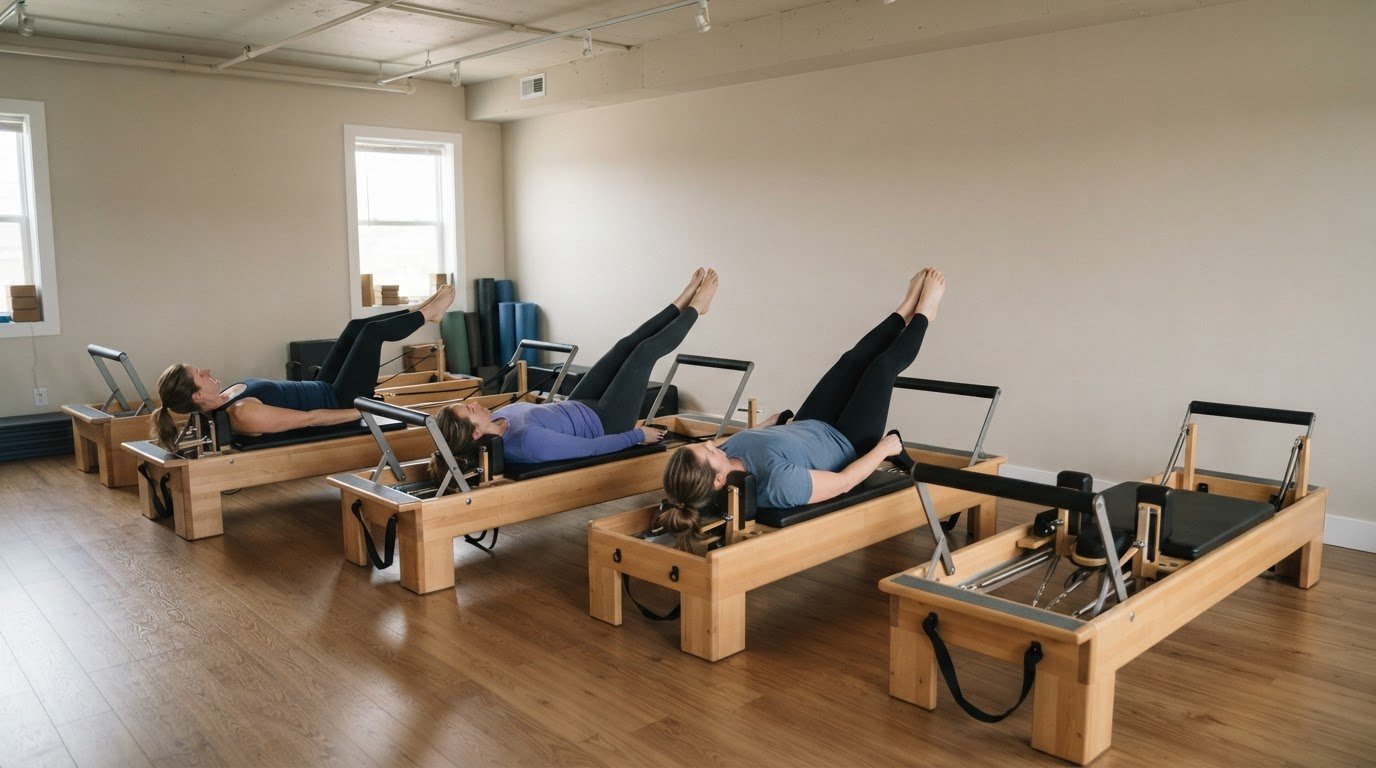
A Reformer class can be fully booked and still be poorly managed. A booking system for reformer Pilates machines should cap each class at the number of available Reformers: a studio with eight machines can take up to eight bookings. It should also make cancellations, waitlists, and class passes easier to manage.
Every spot is tied to a piece of equipment, not just a headcount. The right software helps keep bookings within that limit, while giving clients a clear way to reserve a class and staff a simpler way to manage the schedule.
This guide explains how booking software handles equipment-based capacity and what to compare when choosing a platform. It covers class limits, waitlists, pass management, and ease of use, helping you focus on features that match your studio instead of getting lost in a long list of options.
• See how waitlists and cancellation handling can help studios make newly open class spots available to clients.
• Learn why reformer and mat classes may need different capacity settings based on the space and equipment used.
• Compare platforms by how they handle passes, memberships, instructor schedules, and booking changes.
• Identify the features that make booking straightforward for clients and class administration easier for staff.
• Explore how Pilates and Barre studio software can bring class scheduling, memberships, payments, and staff management together.
Pilates studio booking software manages class schedules, student reservations, cancellations, and payments in one workflow. For Reformer classes, it can also help staff manage capacity, waitlists, and the studio’s cancellation rules.
A student flow starts with choosing a class, viewing available places, and booking with a pass, membership, or payment. The system should show the cancellation policy before the student confirms, so the deadline and any credit consequences are clear. For example, a studio might set a 12-hour cancellation window. Booking software can then apply that rule consistently to each reservation.
Test the flow for a full class, a student changing plans, and a booking made with a class pack. A cancellation should update the class roster and the student’s account together, so staff don’t have to change attendance and credit balances separately. Students should also be able to find upcoming reservations and cancel through the same booking path.
When a Reformer class is full, a waitlist lets students request an opening without staff tracking names manually. If someone cancels, the software can offer the spot to a waitlisted student, notify them, and make the opening available to book. This keeps the cancellation connected to the class roster and makes the next step clear.
Check how the platform handles timing and responses. For instance, a cancellation 10 minutes before class leaves little time to fill the place. Automated SMS and email reminders can alert students about bookings, while a waitlist notification can tell the next person an opening is available. Clear messages should explain how to claim the spot and what happens if it’s not taken.
Waitlist settings matter when students have different passes or memberships. The system should show whether a student can use an available credit for the newly opened spot. That reduces checkout confusion and helps staff see who has secured the booking. A useful process updates the class list when a student accepts, so instructors aren’t left reconciling an outdated waitlist and roster.
Late-cancellation and no-show policies define what happens when a student cancels after the deadline or doesn’t attend. A studio may keep the class credit for a late cancellation, return it for an earlier one, or apply different rules by booking type. The software should reflect the studio’s policy, show it during booking, and apply the relevant outcome to the student’s account.
Consider a class-pack booking separately from a single payment. If an eligible cancellation returns credit, the balance should update; if a late cancellation uses the credit, the record should show that too. Clear transaction details help staff explain a student’s balance without reconstructing booking history. They also help students understand how cancellations affect future reservations.
For example, a cancellation request made shortly before class may fall outside the studio’s chosen window. Staff need a reliable record of the booking time, cancellation time, and policy outcome. Compare how platforms handle exceptions and manual adjustments, including who can make them and how the change appears in the account. This is especially useful when a waitlisted student takes the released spot but the original booking still needs the correct credit outcome.
A booking system for reformer Pilates machines should limit each class by available equipment, not a generic attendee cap. Studios should also choose booking and payment tools that support applicable U.S. privacy and payment-security requirements. Software alone doesn’t make a studio compliant. During setup, class capacity should reflect the schedule, instructor availability, and machine count. General fitness software can risk overbooking if its capacity settings don’t account for equipment.
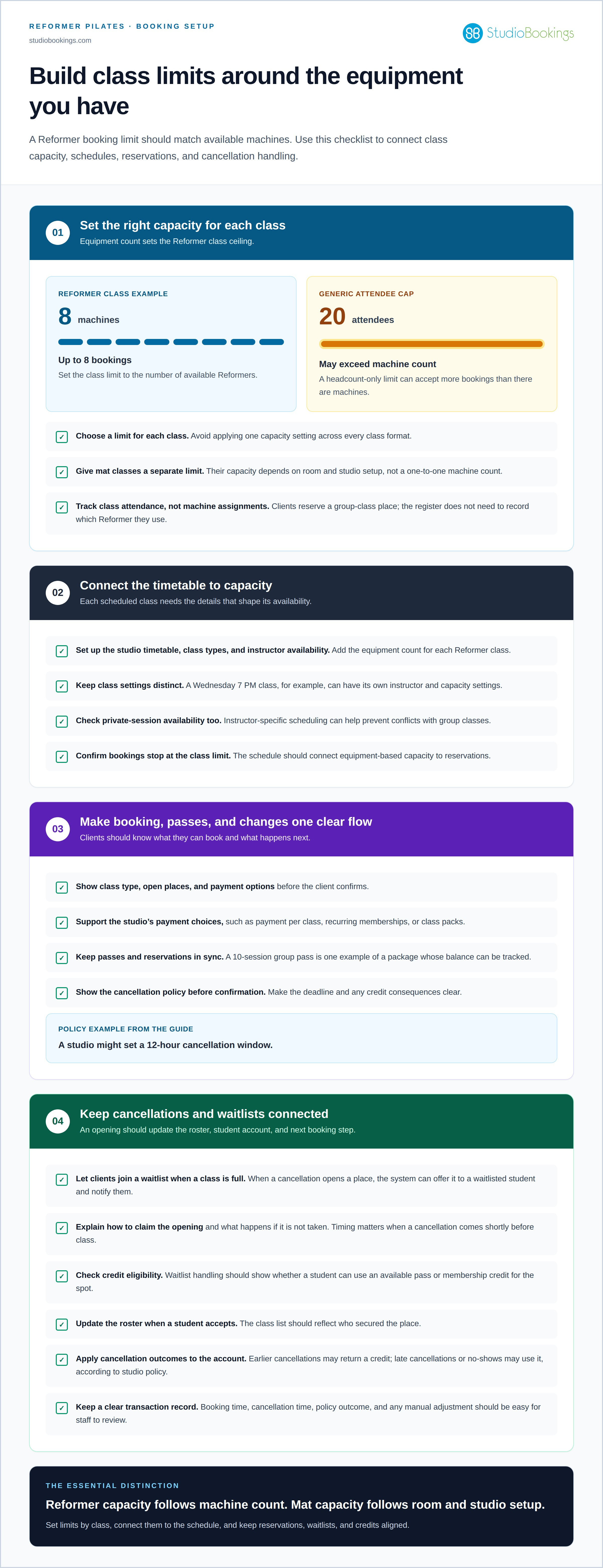
Equipment sets the maximum practical enrollment for a Reformer class. A studio with eight Reformers can book up to eight people into that class. A generic tool set to 20 attendees could exceed the available machines. Look for settings that let staff assign capacity separately to each class, rather than applying one limit across every format.
Mat classes need a different approach. Their capacity depends on available room and studio setup, not a one-to-one machine count. Separate settings can account for both formats. Clients book a place in the group class, not a numbered machine, and the register doesn’t record which Reformer they used. The key distinction is between tracking class attendance and assigning individual equipment.
Schedule setup starts with the studio timetable, class types, instructor availability, and equipment count. A provider can enter those details so each Reformer class has its own machine-based cap and each mat class has a separate limit. For example, a Wednesday 7 PM class can have its own instructor and capacity settings.
General fitness software may set an attendee cap without connecting it to Reformer equipment, creating a risk of accepting more bookings than there are machines. A booking system for reformer Pilates machines should link schedules to capacity and stop reservations once the class limit is reached. Private sessions also need instructor-specific availability to prevent conflicts with group classes.
Online booking should show the class type, open places, and payment options before confirmation. Studio software may support payment per class, recurring memberships, or class packs. A 10-session group pass is one example of a package whose balance can be tracked. A second booking system for reformer Pilates machines comparison should consider package eligibility, so a pass applies only to the classes it covers.
Session balances should account for bookings, attendance, and cancellations. If a package has an expiration date, the system should display and apply it consistently. Staff should be able to see whether a client’s remaining credit covers a specific class. This makes capacity, booking, and payment easier to manage without assigning clients to particular machines.
The right fit depends on how your studio runs, not just its current class count. Compare daily admin, client experience, onboarding needs, and whether your priority is smoother operations or reaching new clients.
Start with the tasks staff repeat each week. A compact studio may need clear schedules, class capacity, and package balances in one place. A busier timetable may call for closer attention to instructor availability, recurring memberships, and schedule changes. Map those needs to real workflows, such as enrolling a client, updating a pass, or recording attendance after a Reformer class.
Onboarding needs a plan for transferring client records and active package balances. Prioritize useful details such as visit history, preferences, notes, and remaining sessions. For example, a client with an active 10-class pack should have a balance that matches the studio’s existing record. Agree on how staff will handle incomplete or duplicate entries before the new system becomes the daily source of truth.
Consider how records support ongoing client relationships. Staff may need to see booking history before helping with availability or a package question. Profiles that bring notes and package details together can reduce time spent searching separate files. A successful transition means staff can find the information they use, not simply that a large amount of data has been moved.
Test common tasks from both sides of the booking process. A client should be able to find the right class, see its availability, and use an eligible package without unnecessary steps. Staff should be able to adjust schedules and review client profiles without navigating confusing screens. Trying real tasks during a trial can reveal friction that a feature list won’t.
For group Reformer bookings, clients reserve a place in the class rather than choosing a specific machine. The register also doesn’t record which Reformer each person used. This keeps the booking flow focused on class capacity and attendance. If your studio relies on individual equipment assignments, address that requirement separately in your workflow.
Marketplace exposure and direct booking serve different purposes. A marketplace may help potential clients discover classes, while a studio’s own booking channels support existing members and referrals. Compare discovery options with your goals, then consider whether the platform can connect bookings to your website or social media presence, where tools like frik.io can help schedule and publish content promoting open spots.
Choose based on the outcome you need next. A studio focused on retention may value recurring memberships and clear client histories. A studio building awareness may prioritize discoverability and a simple first booking. Either way, check that class capacity, package eligibility, and instructor availability fit daily operations.
Compare platforms by how well they match your Pilates studio’s workflows, from calendar changes to checkout and billing. A strong fit connects payments with memberships and class packages, while keeping class capacity and instructor availability clear.
Useful features include online schedules and prepayment, package tracking, instructor-specific availability, and tools for handling substitutions and schedule changes. A thorough comparison also considers support for multiple rooms or locations, what pricing includes, and how easily clients can book.
For a studio using several rooms, schedules should clearly identify the room and class format. That helps staff avoid assigning overlapping sessions to the same space. A multi-location operation also needs calendars that distinguish each site’s classes, instructors, and availability. Compare how staff switch between locations and whether clients can find the right schedule without confusing addresses or class listings.
Schedule changes matter, too. Substitute instructors and room changes should update the relevant calendar and booking details. This makes planning easier and reduces the risk of double bookings. Look for a workflow that keeps the class, room, instructor, and location connected when staff make an adjustment.
Compare pricing alongside included features, not as a standalone figure. Review how billing is structured, which tools are included, and whether multi-room or multi-location needs affect the plan. A Pilates studio focused on payments and class packages may value different features from one prioritizing scheduling and client discovery.
Custom branding, website integration, and social media booking links can shape the client experience. Consider how they fit your existing booking journey. Also review the support available when clients have a question or booking problem. A platform’s value depends on the workflows it handles, not simply the number of features listed.
Platforms can connect completed visits with payments, memberships, and packages through integrated checkout. Compare how a client pays per class, uses a pass, or books through a recurring membership. The booking and billing records should reflect the same transaction, so staff can follow the connection from reservation to payment.
Check what clients see before confirming a booking. A clear schedule, package balance, and checkout flow help them choose the right option. For example, a client using a class pack should be able to see whether it applies to the selected class. Compare how the system records visits and how staff resolve payment or package questions.
Compare platforms by how they handle a complete studio workflow, not by feature count alone. Follow a client from finding a class to booking, attending, and resolving a question about a session.
Start by distinguishing a general calendar tool from studio-focused software. A calendar may organize appointments, while a specialist platform can connect instructor schedules, class calendars, service menus, equipment availability, membership rules, and package balances. For a Reformer studio, that connection matters because the schedule must reflect both the instructor and the class’s equipment-based capacity.
Then compare booking for group classes and private sessions. Private Pilates bookings need instructor-specific availability, while group bookings depend on class capacity and the schedule. Check whether clients can view classes and prepay, and whether checkout presents the right package or membership. These steps show whether one platform can support different services without creating disconnected records.
Automation is another point of difference. A platform may manage schedule changes, substitute instructors, and waitlist openings automatically, or require staff to update each detail manually. Consider a cancelled spot: check whether the class calendar, available capacity, and booking record update together. That’s more useful than seeing “automation” on a feature list without knowing what it covers.
Review how the platform supports attendance and the client-facing experience. Instructors may check clients in by phone or scanning, while self-check-in isn’t available in every workflow. Custom branding can make a booking app feel connected to the Pilates studio rather than generic. Website or social media integration can also shorten the path from discovering a class to reserving it.
Support and pricing need context, too. Compare what each plan includes, how billing works, and whether the features match your studio’s schedule and client needs. Don’t judge a platform by its lowest tier alone if essential workflows are elsewhere. Also consider how client support handles booking questions, since confusion over a cancellation or package balance can quickly become a staff task.
A simple comparison scorecard keeps the decision practical. Rate each platform against the same needs: equipment-based capacity, group and private bookings, integrated checkout, schedule changes, attendance, and client support. Then test a real example, such as changing the instructor for a scheduled class and checking that the calendar updates. The best fit depends on the tasks your team handles most often and where manual steps create friction.
Use those criteria to choose software around your studio’s actual workflow, not a generic feature checklist. Explore Pilates studio booking options for a platform that brings class scheduling, payments, memberships, and staff management together.
StudioBookings brings class scheduling, memberships, payments, and staff management together in one dashboard. Its Pilates and Barre Studio Software can help studios manage daily operations alongside Reformer class bookings. Use it to organize schedules and keep essential business workflows connected, rather than handling each through separate tools.
StudioBookings is a practical next step if your current process makes it difficult to align bookings, payment records, and staff schedules. Its mobile app is free for studio owners and members, so both groups can access the platform on the go.
Contact StudioBookings to discuss how its Pilates and Barre Studio Software fits your studio’s needs.
Your booking setup should support how your studio operates now and the changes you plan next. Class formats, instructors, and client booking habits may shift as your timetable evolves. A booking system for Reformer Pilates machines should continue to fit those workflows without adding unnecessary admin.
StudioBookings offers Pilates and Barre Studio Software, as well as Yoga Studio Software and Fitness and HIIT Studio Software. These options help studios bring core scheduling and management tasks together. The next step is to identify which parts of your booking process need the most attention, then match them to the workflows your team uses every day.
That gives you a practical basis for choosing software rather than relying on a long feature list. Think about the experience you want clients to have, too. A clear booking journey can make it easier for them to stay engaged as your class program develops.
Contact StudioBookings about your studio to explore a setup that fits your needs. Your next step can be simple and focused.
Usually, clients book a place in the class rather than selecting a numbered Reformer. The booking screen should show available class places without implying that a specific machine is reserved. This keeps reservations focused on class capacity. If your studio needs to track individual machine assignments for maintenance or follow-up, keep a separate record, since the booking register doesn’t show which Reformer each attendee used.
No, one studio platform can manage both formats if it supports group schedules and instructor-specific availability. Group classes need a shared timetable and class capacity, while private lessons depend on an individual instructor’s schedule. Keeping both in one system can make it easier to see conflicts. For example, a private booking shouldn’t overlap with the same instructor’s scheduled group class.
Set a clear cancellation deadline and define what happens to the booking’s payment or class credit after that point. An early cancellation might return a pack credit, while a late cancellation or no-show uses it. Configure the booking system to apply the studio’s chosen rule and keep the transaction record visible. This gives staff a consistent reference when a client asks about their balance.
Yes, set the class capacity to match the Reformers available for that session. If a studio has eight machines, its Reformer class can be limited to eight bookings. Set a separate capacity for mat classes, since their limit depends on the room and setup rather than a one-person-per-machine count. Separate limits help prevent an unsuitable cap for either format.
Yes, you can schedule private Pilates sessions alongside group classes. The booking system should show each instructor’s availability so clients can reserve an open appointment without creating a conflict with a class. Keep the session type clear in the calendar, too, so staff can distinguish private appointments from group bookings when reviewing the day’s schedule or managing instructor changes.
Yes, use a platform with class-capacity controls and set the limit to the equipment available for the session. Once the limit is reached, the booking flow should stop accepting reservations. A waitlist can then record interest in the full class. This differs from a general attendee limit that doesn’t account for the number of Reformers in the room.
No, clients can’t check themselves in through the described attendance process. An instructor can record attendance using a phone or scanning workflow, retaining control of the register as members arrive. Decide how staff will handle late arrivals or bookings missing from the list, so attendance stays accurate without asking clients to mark themselves present.
No, clients book a place in the Reformer class, not a particular machine. The booking register also doesn’t record which Reformer each client used. If a client asks for a specific machine, explain that the reservation confirms class attendance, not an equipment assignment. Keep machine-use tracking separate from the class booking record if the studio needs that information.